This is a free bid proposal template for contractors. It is a fill-in proposal for Word, Google Docs or PDF that covers scope of work, exclusions, price, payment schedule and signatures, and it comes with a bid tracker spreadsheet that shows your win rate and which bids need a follow-up.
Free — enter your email at checkout and download it instantly. No card required.
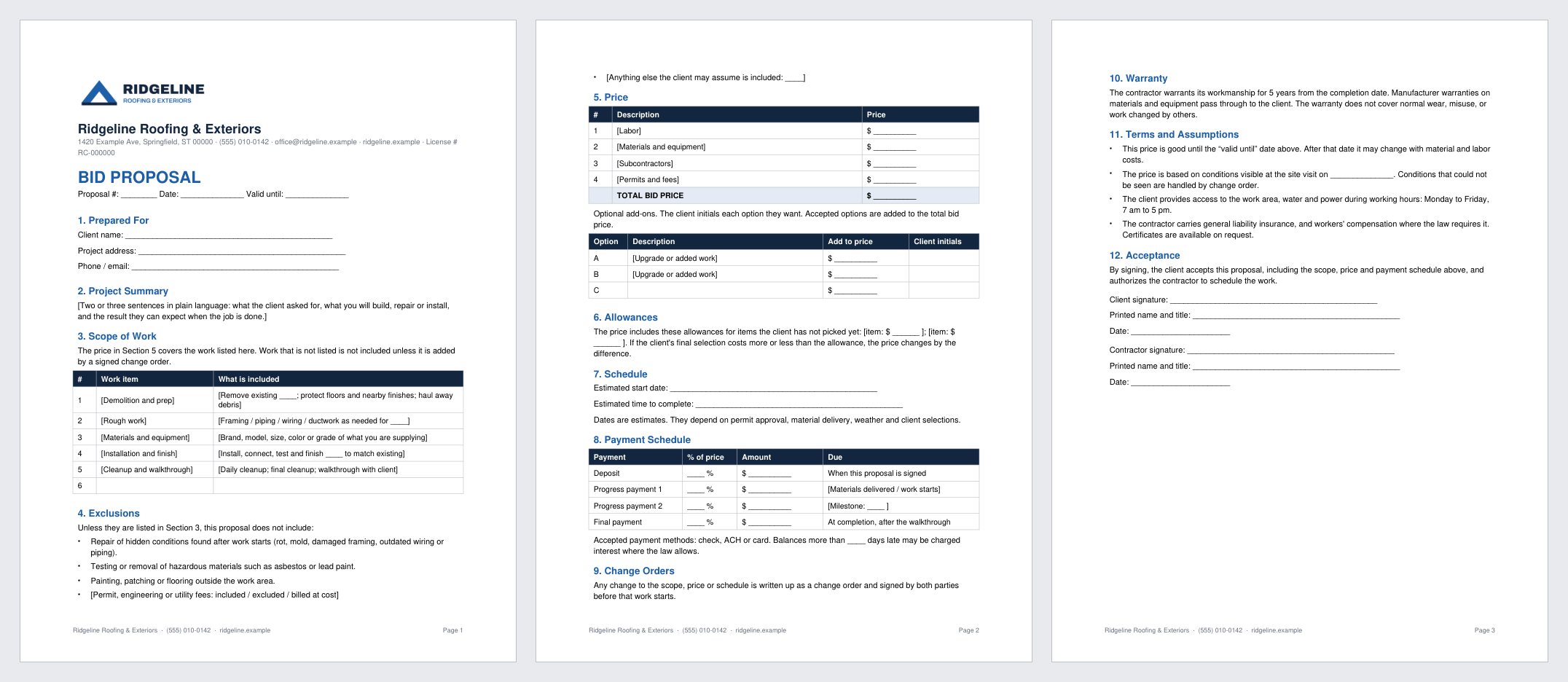
A proposal a homeowner can read and sign, without paying for proposal software. Twelve short sections on three pages, written in plain language. Replace the text in brackets, save it as a PDF and send it.
- Bid proposal template in Word (.docx), which also opens in Google Docs and Pages
- The same proposal as a print-and-fill PDF
- Scope of work and exclusions tables, so nobody argues later about what was included
- Price table with optional add-ons the client initials
- Payment schedule, change order, warranty and acceptance sections
- Bid Tracker & Win-Rate Log for Excel and Google Sheets: win rate, dollars won, open pipeline, follow-ups due, and results by lead source
Heads up: this is a template, not legal advice. Many states require specific wording in home improvement contracts, and some cap the deposit you can collect. Check your state’s rules or have an attorney review it before you use it with a customer.
You fill in your own company details. Word, Google Docs and PDF, plus the bid tracker spreadsheet.
Get it freeThe same proposal with your logo, colors and company details already on it. Fill in a short form and get Word and PDF files by email, usually within the hour.
 See the branded version — $29
How to use it
- Open the Word file and replace everything in brackets. Delete the rows and sections you do not need, and delete the instructions page at the end.
- Fill in the scope and the exclusions for this job. Most payment disputes start with a vague scope.
- Use the Payment Schedule tab of the spreadsheet to turn your price and percentages into dollar amounts, then copy them into the proposal.
- Save the proposal as a PDF and send it. Add a row for it in the Bid Log.
- Check the Dashboard each week for your win rate and the follow-ups that are due.
Common questions
Is it really free?
Yes. It costs $0. Enter your email at checkout and the download link arrives right away, with no card required. The newsletter checkbox at checkout is optional.
What is the difference between a bid, an estimate and a proposal?
An estimate is your best guess at the price. A bid is a firm price for a defined scope. A proposal is the document that presents that price along with the scope, exclusions, schedule, payment terms and a place to sign.
Is a signed proposal a contract?
It can be, but the rules depend on your state and the type of work. Many states require specific wording or notices in home improvement contracts. If your state has a required contract form, use that form and attach this proposal as the scope and price.
How does the tracker work out win rate?
Win rate is bids won divided by bids won plus bids lost. Open bids and bids with no decision are left out, so a slow week of replies does not drag the number down.
When should I move to bid proposal software?
When you send enough proposals that e-signatures, open tracking and automatic follow-ups would save real time, or when you want good, better, best options the client can pick on a phone. Our proposal software guide compares the options and what they cost.
Related
- Best proposal software for contractors
- Branded Bid Proposal — this proposal with your logo, colors and details, done for you. $29.
- Estimate Template Pro — free, prices each line from your cost and markup.
- Contractor Invoice Template — free, for billing the job once it is won.
- Contractor markup vs. margin
Get the template
You fill in your own company details. Word, Google Docs and PDF, plus the bid tracker spreadsheet.
Get it freeThe same proposal with your logo, colors and company details already on it. Fill in a short form and get Word and PDF files by email, usually within the hour.
See the branded version — $29