Which platform is actually worth the money — and at what point does the math flip?
Pricing note — updated 2026-08-19. Jobber and Housecall Pro figures on this page were re-read from the vendors’ own pricing pages on 2026-08-19 and are current. ServiceTitan publishes no pricing at all — its pricing page lists four plan names (Starter, Essentials, The Works, Enterprise) and zero dollar figures, confirmed 2026-08-19. Every ServiceTitan cost figure below is therefore our own modelled estimate, not a vendor-published price, and should be treated as a planning range to test against a real quote — not as a number ServiceTitan has stated. The Service Fusion range is carried from an earlier read and was not re-confirmed on 2026-08-19; its pricing page rendered no visible figures that day.
Updated July 28, 2026: CompanyCam, Jobber, Housecall Pro and LeadTruffle were re-verified against their own pricing pages and all four had changed. CompanyCam replaced Pro/Premium/Elite with Core/Crew/Scale and dropped its three-user minimum; Jobber now sells tiers with users included; Housecall Pro changed its tiers and now prices by trade and team size (read October 7, 2026, HVAC pricing path: Teams Essentials $299/mo with 5 users, Teams Max $649/mo with 8 users); LeadTruffle no longer publishes pricing at all. Other vendors on this page still carry their earlier verification date.
The most common question HVAC contractors ask about software isn’t ‘what does it do.’ It’s ‘what does it cost me if I get this wrong.’ ServiceTitan and Jobber are the two platforms that come up in every HVAC owner’s research — and the gap between them is enormous in both price and capability. Choosing the wrong one at the wrong stage of growth is a mistake that costs you a year of software spend and months of implementation time. For the full field beyond these two, our best software for HVAC contractors comparison covers five platforms with verified pricing.
New: This article goes deep on the ServiceTitan vs Jobber decision specifically. If you’re earlier in your evaluation and want the full HVAC software stack — FSM, missed-call rescue, photo docs, reviews, accounting — start with Best AI Tools for HVAC Contractors in 2026 for the umbrella view, then come back here for the head-to-head.
This isn’t a feature checklist. It’s a cost-benefit analysis built specifically for HVAC contractors — because the right answer for a 3-tech residential service shop is completely different from the right answer for a 25-tech commercial HVAC operation. We’ll show you exactly where the math breaks each way.
HVAC contractors face structural labor pressure heading into 2027 — Bureau of Labor Statistics projections show roughly 42,500 HVAC mechanic and installer openings annually through 2034. The contractors who run the tightest operations — dispatch, scheduling, lead follow-up — will take the most work as the labor pool shrinks.
ServiceTitan vs Jobber: Quick Comparison
| Factor | Jobber | ServiceTitan |
| Best for | 1–15 techs, residential service | 20+ techs, complex commercial ops |
| Annual cost (8 techs) | ~$3,072–$4,188 | Not published |
| Setup time | Days | Not published |
| AI features | Smart scheduling, AI quoting | Advanced dispatch AI, revenue forecasting |
| Marketing tools | Basic | Full automation suite |
| Reporting depth | Job and revenue tracking | Enterprise-grade analytics |
| Contract | Month-to-month available | Annual contract required |
| Free trial | Yes | No |
Vendor prices change without notice. For the current verified figures on every vendor we track — read from each vendor’s own pricing page and dated — see the contractor software pricing tracker.
Estimates based on contractor-reported data and industry benchmarks. Individual results vary by business size, market, and implementation.
1. Jobber — Best for HVAC Contractors Under 15 Techs
| Bottom line: If your HVAC business runs 1–15 techs and you’re still managing jobs on spreadsheets or a whiteboard, Jobber pays for itself in the first month. Most shops recover the subscription cost from automated invoice follow-ups alone. |
Jobber is built for the HVAC contractor who needs scheduling, quoting, invoicing, and customer communication to work without a dedicated ops staff. Its AI features aren’t trying to replace a dispatcher — they reduce the manual work that eats 4–6 hours a week for most owner-operators. Setup takes days, not months. And at $199/month for the Grow plan (Individual) or $599/month for Plus (10 users included), one recovered service call per month covers the subscription.
The highest-ROI feature for HVAC specifically is the automated invoice and follow-up system. HVAC contractors running seasonal maintenance agreements — spring AC tune-ups, fall furnace checks — can automate the entire outreach, booking, and invoice sequence. For a contractor with 200 maintenance customers, even a 10–15% improvement in automated reminder conversion translates to recovered seasonal revenue that typically covers the platform cost several times over. Actual results depend on existing renewal rates, customer base composition, and price points.
What Jobber Does for HVAC Specifically
- Smart scheduling with location-based routing — reduces drive time between service calls, increases jobs completed per tech per day
- Online booking widget — customers self-schedule tune-ups and non-emergency calls, meaningfully reducing inbound call volume for shops that implement it
- Automated maintenance agreement reminders — sends service due notices via text or email, recovers lapsed maintenance customers without manual outreach
- AI-assisted quoting — suggests line items based on job history, reducing estimate time for repeat job types
- Client hub — customers approve quotes, pay invoices, and request service online, eliminating the payment chase that consumes office staff time
Honest Limitations
- Reporting is shallow — Jobber tracks jobs and revenue but doesn’t offer the margin-by-tech or call conversion analytics that growing operations need to make staffing decisions
- Marketing automation is basic — no postcard campaigns, no automated review generation beyond a simple request, no upsell campaign sequencing
- Will feel constraining at 15+ techs — the scheduling and dispatch tools don’t handle the complexity of multiple service zones, mixed residential/commercial, or advanced skill-based routing
Pricing: Core $49/month, Connect $139/month (Individual), Grow $199/month (Individual). Team plans run $199–$399/month for 5–10 users included; Plus $699/month for 15 users. Month-to-month available. Free trial included.
Cost Comparison by Team Size — Jobber vs ServiceTitan
Want the HVAC prompts we use?
The HVAC AI Toolkit: 12 HVAC-specific prompts, 10 ready-to-send client scripts, and 3 business tracking templates — built from the research behind this article. Instant download, direct from us.
2. ServiceTitan — Best for HVAC Operations 20+ Techs
| Bottom line: ServiceTitan is the right answer for a large, complex HVAC operation — and the wrong answer for almost everyone else. The ROI is real at scale. At under 15 techs, you’re paying enterprise prices for features you won’t use for 3 years. |
Not sure ServiceTitan is the right size for your shop? ServiceTitan is quote-only, so the number you get depends entirely on your headcount and call volume. Worth checking where you land before you sit through a sales call.
Take the 60-second readiness check → See the smaller-shop alternatives →
ServiceTitan is the most comprehensive field service platform on the market for HVAC, and it earns that position for large operations. AI-powered dispatch, revenue forecasting, technician performance analytics, automated marketing campaigns, call recording with AI analysis — the feature depth is genuine. ServiceTitan markets significant revenue recovery potential from its analytics tools at enterprise scale, particularly through Pricebook Pro pricing optimization and dispatch efficiency gains. Actual recoverable revenue varies substantially by operation.
The problem is the cost-benefit math at smaller scale. ServiceTitan does not publish pricing. Its pricing page lists four packages — Starter, Essentials, The Works and Enterprise — each behind a “Request Pricing” form, and describes the model only as per-technician (checked September 8, 2026). Per-year figures circulating on comparison sites are either one contractor’s own negotiated deal or invented, so we don’t repeat them as fact. Implementation timelines are likewise unpublished. Annual contracts mean you’re committed before you’ve verified fit. ServiceTitan does not publish pricing, so there is no honest way to model that commitment before you have a written quote in hand — which is itself the point: you are agreeing to an annual contract at a number only their sales team can give you.
What ServiceTitan Does for HVAC Specifically
- AI dispatch optimization — automatically assigns technicians based on location, certification, job history with that customer, and predicted job duration to maximize profitable calls per day
- Revenue forecasting and Pricebook Pro — analyzes your pricing against regional benchmarks, identifies where you’re underpriced on specific service types, and suggests price adjustments with win-rate data
- Marketing automation suite — automated follow-ups for unsold estimates, maintenance reminder campaigns, Google review generation, and postcard campaigns all built into one platform
- Call recording and AI analysis — records inbound calls, analyzes booking rates by CSR, identifies missed opportunities and coaching needs without manual review
- Technician performance dashboard — revenue per tech, hours per job type, callback rate, customer satisfaction by technician — the data to make staffing decisions with confidence
Honest Limitations
- Pricing is quote-only — ServiceTitan publishes neither a baseline nor a per-tech rate — so a 10-tech shop cannot estimate annual cost, or payback period, without a written quote through recovered revenue
- 2–3 month implementation — your team’s productivity drops during onboarding, and the learning curve is steep enough that some smaller operations never fully utilize what they’re paying for
- Annual contract required — you’re locked in before the platform has proven ROI for your specific operation, with limited exit options if the fit isn’t right
Pricing: Custom — not published; ServiceTitan quotes per technician. Annual contract. No free trial.
Best for: HVAC operations 20+ techs, $3M+ revenue, with dedicated office staff to manage the platform.
Feature Strength Comparison — By Category
| Feature | Jobber | ServiceTitan |
|---|---|---|
| Core field service management | ||
| Drag-and-drop scheduling & dispatch | Yes | Yes |
| AI dispatch optimization (auto-routing) | Limited | Yes |
| Mobile app for field techs | Yes — strong | Yes |
| Online booking widget | Yes | Yes |
| Quote/estimate builder | Yes | Yes |
| Automated invoice & payment follow-up | Yes | Yes |
| Client portal for approvals & payments | Yes | Yes |
| Two-way SMS with customers | Yes (Grow tier) | Yes |
| Call recording & AI call analysis | No | Yes |
| Marketing & growth | ||
| Automated review request after job | Yes | Yes |
| Email marketing campaigns | Add-on — Marketing Suite, $99/mo | Yes (built-in) |
| Postcard/direct mail campaigns | No | Yes |
| Maintenance agreement reminders | Yes | Yes |
| Unsold estimate follow-up automation | Limited | Yes |
| Referral program management | Add-on | Yes |
| Reporting & operations | ||
| Job & revenue tracking | Yes | Yes |
| Margin-by-technician analytics | No | Yes |
| Revenue forecasting | No | Yes |
| Pricebook with regional benchmarks | No | Yes (Pricebook Pro) |
| CSR call conversion tracking | No | Yes |
| Custom report builder | Limited | Yes |
| Implementation & contract terms | ||
| Setup time | Days | Not published |
| Free trial | 14 days | No |
| Month-to-month available | Yes | No (annual contract) |
| Onboarding/implementation fee | $0 | Not published |
| Training requirement | Self-serve | Dedicated team |
Comprehensive feature comparison between Jobber and ServiceTitan field service management platforms for HVAC contractors. Across Core FSM features, Jobber matches ServiceTitan on most basics but ServiceTitan offers AI dispatch optimization and call recording with AI analysis that Jobber doesn’t. In Marketing & Growth, ServiceTitan includes built-in email campaigns, postcard direct mail, and referral programs while Jobber requires paid add-ons for similar capability. In Reporting & Operations, ServiceTitan offers margin-by-technician analytics, revenue forecasting, Pricebook Pro with regional benchmarks, and CSR call conversion tracking that Jobber doesn’t. In Implementation, Jobber wins decisively with days-long setup, 14-day free trial, month-to-month availability, no onboarding fee, and self-serve training versus ServiceTitan’s dedicated implementation process, no free trial, annual contract requirement, an onboarding fee ServiceTitan does not publish, and dedicated training team requirement.
The Cost-Benefit Analysis: Where the Math Actually Breaks
The question isn’t which platform has more features — ServiceTitan wins that comparison by a wide margin. The question is: at what point does the additional cost of ServiceTitan produce more value than the savings from running Jobber?
The Jobber Math — 8-Tech HVAC Shop
Illustrative scenario for an 8-tech HVAC operation. Inputs reflect typical industry ranges discussed by FSM vendors and contractor operators; specific outcomes vary widely by operation. Use as a directional framework, not a forecast.
| Metric worth tracking | Your number today | Your number after 90 days |
|---|---|---|
| Admin hours per week (scheduling, invoicing, chasing payment) | ||
| Average days from job complete to payment received | ||
| Maintenance agreement renewal rate | ||
| After-hours calls that never got a callback | ||
| Monthly software cost |
Deliberately blank. We removed the “before and after” figures that used to sit here because we had no source for them — not a vendor study, not a survey, nothing. Any comparison table that hands you a specific hours-saved or revenue-recovered number for your shop invented it. Measure your own five rows before you switch, and again ninety days after; that is the only version of this table that means anything.
Scenario assumes baseline operation with significant manual processes; existing sophistication of office workflow significantly affects realized improvement.
Jobber Math — 8-Tech Shop: the cost side you can look up (plan figures above). The return side you cannot. We have no sourced figure for the revenue a shop gains by switching software, and any specific number quoted for it — here or on any comparison site — is an estimate wearing a fact’s clothing. Work it out with your own inputs instead: count the hours a week currently lost to scheduling, invoicing and chasing payment, price them at your burdened hourly cost, and set that against the subscription.
The ServiceTitan Math — 8-Tech HVAC Shop
Illustrative scenario for an 8-tech HVAC operation. Inputs reflect typical industry ranges discussed by FSM vendors and contractor operators; specific outcomes vary widely by operation. Use as a directional framework, not a forecast.
| Metric | Jobber ($149/mo) | ServiceTitan (quote only) |
| Annual software cost | ~$3,072 | Not published |
| Annual cost difference | — | Required annual additional revenue to break even: not calculable without a quote |
| Additional revenue needed to justify | — | An amount you cannot determine without a quote from ST-specific features |
| Realistic additional revenue at 8 techs | — | Not estimable here* |
| Break-even timeline | Month 1 | Month 7-8 |
| Risk if platform underutilized | Low ($149/mo loss) | High (a multi-year commitment at an undisclosed rate |
ServiceTitan Math — 8-Tech Shop: we can’t show you one, and neither can anyone else who hasn’t been quoted. ServiceTitan does not publish pricing. Its pricing page lists four packages — Starter, Essentials, The Works and Enterprise — each behind a “Request Pricing” form, and describes the model only as per-technician (checked September 8, 2026). Any monthly figure, onboarding fee or break-even month you see for ServiceTitan on a comparison site was either supplied by a specific contractor about their own deal or made up. So instead of a fake model: ask their sales team for the per-technician rate at your headcount, the onboarding fee, the contract length, and what the rate does at renewal — in writing — then run those four numbers against the Jobber figures above yourself.
The honest conclusion from this math: ServiceTitan’s additional revenue potential is real but requires full platform utilization — marketing automation, Pricebook Pro, call coaching — to materialize. In practice, smaller operations frequently struggle to fully utilize ServiceTitan’s marketing automation, Pricebook Pro, and call coaching features without dedicated office staff. ServiceTitan’s customer success team works to drive utilization, but partial-utilization at smaller scale is a documented pattern. The break-even timeline of 7–8 months assumes full utilization from Month 1, which almost never happens. In practice, factor an additional 3–6 months for partial-utilization realities, putting practical break-even at Month 10–14.
Break-Even Analysis — 36-Month Net Return
Which Platform Is Right for Your HVAC Business?
Here’s the decision framework based on where your business actually is — not where you plan to be in 3 years.
Choose Jobber If:
- You run 1–12 techs and your primary pain points are scheduling, invoicing, and customer communication
- You want to be operational in days, not months
- In our judgment you’re not yet at the revenue scale where a platform this heavy pays for itself
- You need month-to-month flexibility — seasonal HVAC businesses especially benefit from flexible pricing structures
Monthly investment: $49–$399 depending on team size.
Choose ServiceTitan If:
- You run 20+ techs and have dedicated office staff who will actively manage the platform
- You’re doing $3M+ in annual revenue — at that scale, a 3% revenue improvement from better dispatch and pricing covers the software cost
- Marketing automation is a priority — ServiceTitan’s automated campaigns for maintenance reminders, unsold estimates, and review generation are significantly more sophisticated than Jobber’s
- You need enterprise-grade reporting — margin by technician, call conversion by CSR, revenue forecasting
Monthly investment: quote-only — ServiceTitan does not publish rates, so payback cannot be modelled until you have a written quote.
The Gap in the Middle (12–20 Techs)
This is where the decision is hardest. You’ve outgrown Jobber’s reporting and dispatch tools but the ServiceTitan math is difficult to justify. Two real options worth evaluating — and a third we cover in our 2026 HVAC stack breakdown: Service Fusion’s plans, quoted on a demo (no prices published as of October 15, 2026), are worth pricing for the 12-20 tech bracket.
Housecall Pro (HVAC pricing path: Basic $79/month; Essentials $299/month for 5 users; Max $649/month for 8 users) sits in true mid-tier — stronger marketing automation than Jobber, less complexity than ServiceTitan, and pricing that keeps the ROI math defensible at this scale. Best fit for HVAC contractors who want to upgrade marketing and customer communication without enterprise costs.
FieldCamp is positioned as a premium AI-native alternative and, like ServiceTitan, is now quote-only: as of September 29, 2026 its Pro, Growth, Scale and Enterprise tiers carry no published prices. Pricing posture is closer to ServiceTitan’s than to Housecall Pro’s, but the value proposition is different: AI-first architecture rather than a legacy platform with AI features added on. For HVAC operations that prioritize modern AI workflow automation and have budget allocated for premium FSM tools, FieldCamp competes with ServiceTitan on architecture rather than on price. For shops focused purely on cost-effective bridges between Jobber and ServiceTitan, Housecall Pro is the more natural choice.
Decision Matrix — Platform by Business Profile
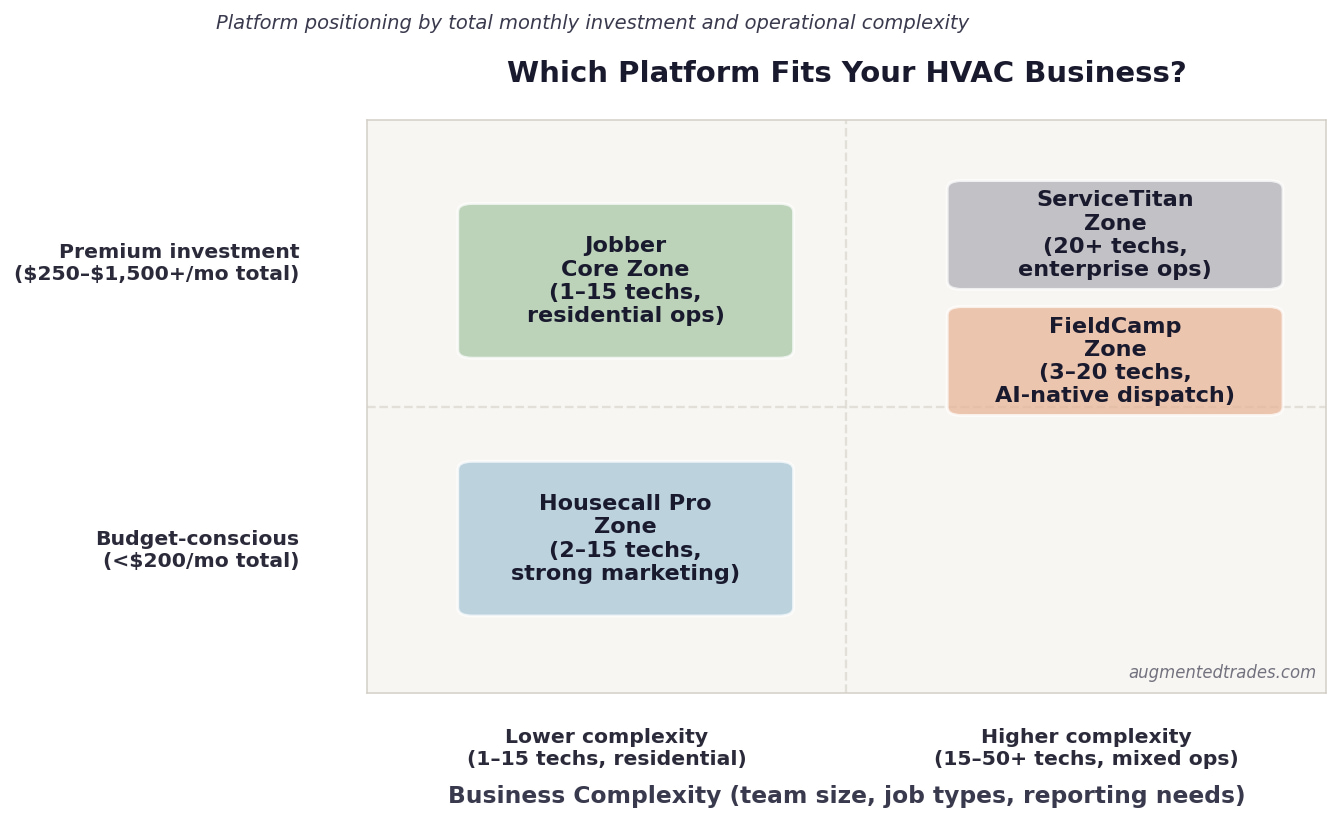
Platform selection guide by business complexity and budget per technician per month.
What to Avoid: An Honest Note
- Signing ServiceTitan’s annual contract to ‘grow into it’ — the implementation burden alone sets most small shops back 60–90 days of productivity before the platform delivers any return
- Dismissing Jobber because it’s ‘just for small contractors’ — Jobber handles 15-tech HVAC operations cleanly and the ROI is faster and more predictable than any enterprise platform at that size
- Choosing based on demos rather than reference calls — ask each vendor for three HVAC contractor references at your exact team size and call them. Demo environments always look better than live operations.
The Bottom Line
| Our recommendation for most HVAC contractors: Start with Jobber if you’re under 15 techs. The cost is low, the ROI is fast, and you can migrate to ServiceTitan later when your revenue and team size justify it. ServiceTitan isn’t going anywhere — but signing an annual contract before your operation is ready to fully utilize it is one of the most common expensive mistakes HVAC contractors make. Grow into it, don’t race into it. |
The best software platform is the one your team actually uses. An underutilized ServiceTitan subscription is more expensive than a fully utilized Jobber account — every time. Start where your business is, not where you want it to be.
Quick Links: The Head-to-Head and the Alternatives
Jobber
The right call for HVAC shops under 15 technicians
Best for: Residential HVAC contractors 1–15 technicians focused on service calls, system installs, and maintenance plans. Setup in days not months. Mobile app works reliably for field crews. AI quoting assist learns from your job history.
Teams: Grow $299 (5u) · Plus $499 (5u) / $599 (10u) / $699 (15u)
Annual saves up to 35%
ServiceTitan
The enterprise platform for $1.5M+ HVAC operations
Best for: Established HVAC contractors with 20+ technicians, dedicated office staff, and the implementation runway to extract the platform’s depth. Pricebook AI, dispatch optimization, technician scorecards, deep marketing attribution.
Onboarding fee not published · Annual contracts
Ask for per-tech rate, onboarding fee and contract length in writing
Housecall Pro
Stronger marketing automation than Jobber, simpler than ServiceTitan
Best for: HVAC shops where 40–60% of revenue comes from repeat customers (maintenance plans, seasonal tune-ups). Targeted email/SMS campaigns and on-my-way customer notifications drive meaningfully more repeat business than Jobber’s simpler tools.
(monthly, HVAC pricing path, read October 7, 2026; prices vary by trade, and the landing page shows lower prices from $59/mo before you pick one)
FieldCamp
AI-native dispatch for HVAC teams who want modern tools
Best for: HVAC contractors who want AI-native dispatch and weather-aware scheduling without ServiceTitan’s complexity or annual contract. Seat counts are set in the quote.
Tiers: Pro · Growth · Scale · Enterprise, priced per quote
FieldEdge
Per-tech FSM with the strongest QuickBooks integration
Best for: Established HVAC shops with 5–15 trucks already running on QuickBooks, with office staff handling dispatch. Coolfront flat-rate pricebook is best-in-class for HVAC service calls. Plan 3–4 months ramp-up for less tech-comfortable crews.
CompanyCam
Photo documentation for HVAC installs and service work
Best for: HVAC contractors doing installs and service work who need time-stamped job-site documentation for warranty claims, callbacks, and equipment disputes. AI auto-categorizes photos by job type.
No user minimum since the 2026 restructure
LeadTruffle
24/7 AI voice agent for HVAC emergency calls
Best for: HVAC contractors handling emergency service work (no heat in winter, no AC in summer), after-hours calls, or anyone losing more than 3–5 leads per week to voicemail. Critical for the seasonal-spike service model.
Scale · quoted on a demo
NiceJob
AI-timed review requests for HVAC operations
Best for: HVAC companies doing 15+ jobs per week who want systematic Google review collection. The AI determines optimal review-request timing based on job type and customer signals. Works on volume — not worth it under 10 jobs/week.
Plus add-on fees for SMS and postcards
The Augmented Trades Recommended Stack by HVAC Operation Size
Affiliate disclosure: Augmented Trades earns commissions when readers sign up for Jobber, ServiceTitan, Housecall Pro, or FieldCamp through our links. All four are affiliate partners. We are not paid more to favor one over another — our analysis reflects honest editorial judgment about which platform fits which kind of HVAC business at which scale. Pricing was verified April 2026 from each vendor’s published pricing page or third-party reports where vendors don’t publish. We make no ROI or savings claims that aren’t directly tied to a cited source. Always verify current pricing on the vendor’s site before purchasing.
More from Augmented Trades:
- weighing more than just these two? See our full ServiceTitan alternatives for small shops article.
- Best AI Tools for HVAC Contractors in 2026 (the full stack breakdown)
- Best AI Tools for Plumbers in 2026
- QuickBooks Online for Trade Contractors: Setup Guide and Field Service Integration Stack (2026)
- How HVAC Contractors Use AI to Win More Bids (2026)
- AI Estimating for HVAC Contractors: DIY vs Done-For-You in 2026
Affiliate disclosure: Augmented Trades participates in affiliate programs and may earn a commission when you sign up through links on this page, at no additional cost to you. We never accept payment for placement or rankings. We earn affiliate commissions on some links, and those never change which tool wins a category. See our full affiliate disclosure.
Answer a few quick questions and our free Tool Finder builds you a custom software shortlist — with the reasoning and pricing behind each pick.
Find your tools (free) →
Michael is the founder of Augmented Trades, an independent site that compares AI and software tools for trade contractors on published pricing, contracts, and real feature limits. Tools are recommended on fit for your shop — affiliate partnerships never decide coverage.