These are free HVAC invoice and estimate templates built for service and replacement work. Both have fields most generic templates leave out: equipment make and model, serial number, and refrigerant type and pounds added. The Excel versions total themselves, so line totals, tax, the total and the deposit or balance due calculate as you type. The PDFs are ready to print and fill in by hand.
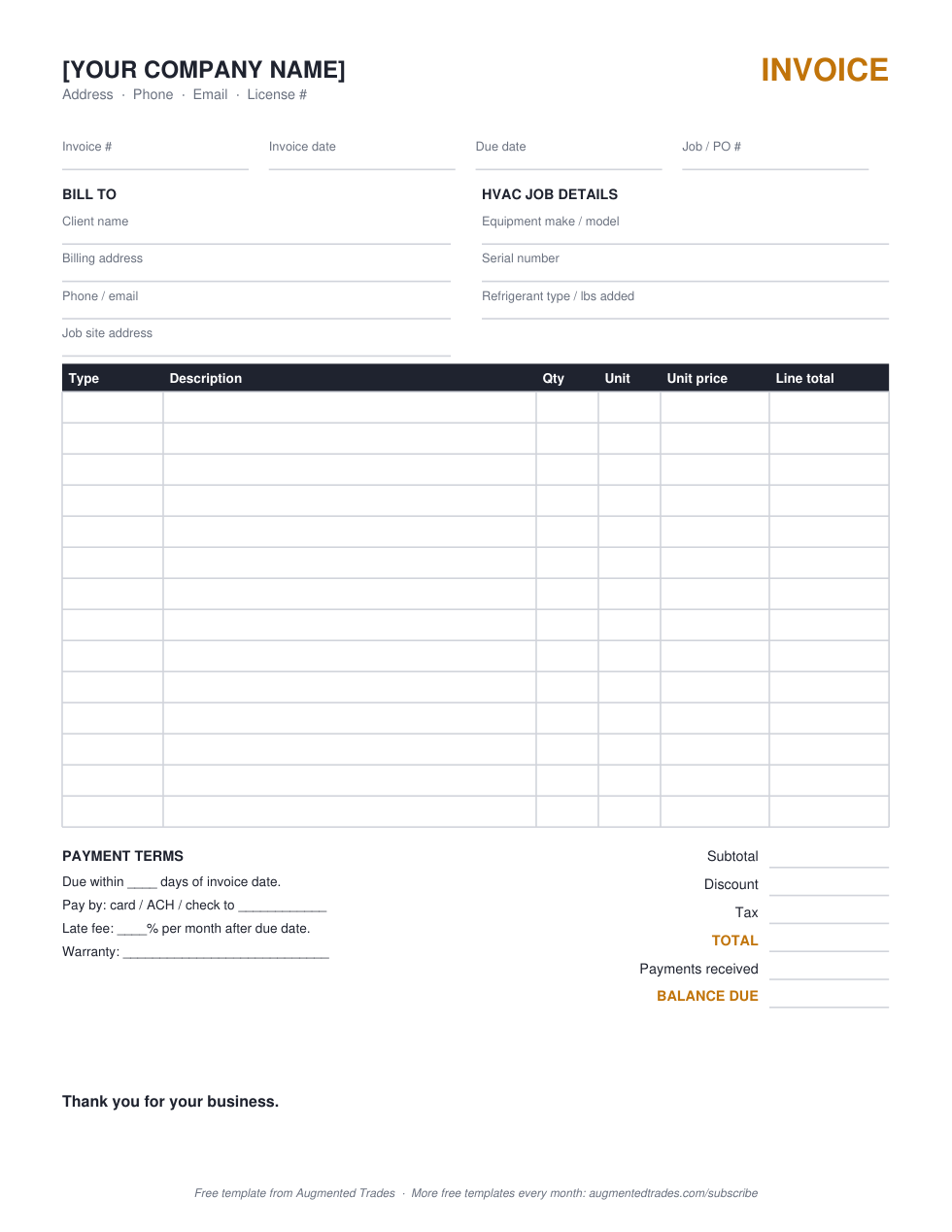
Download the PDF (free, print and fill) →
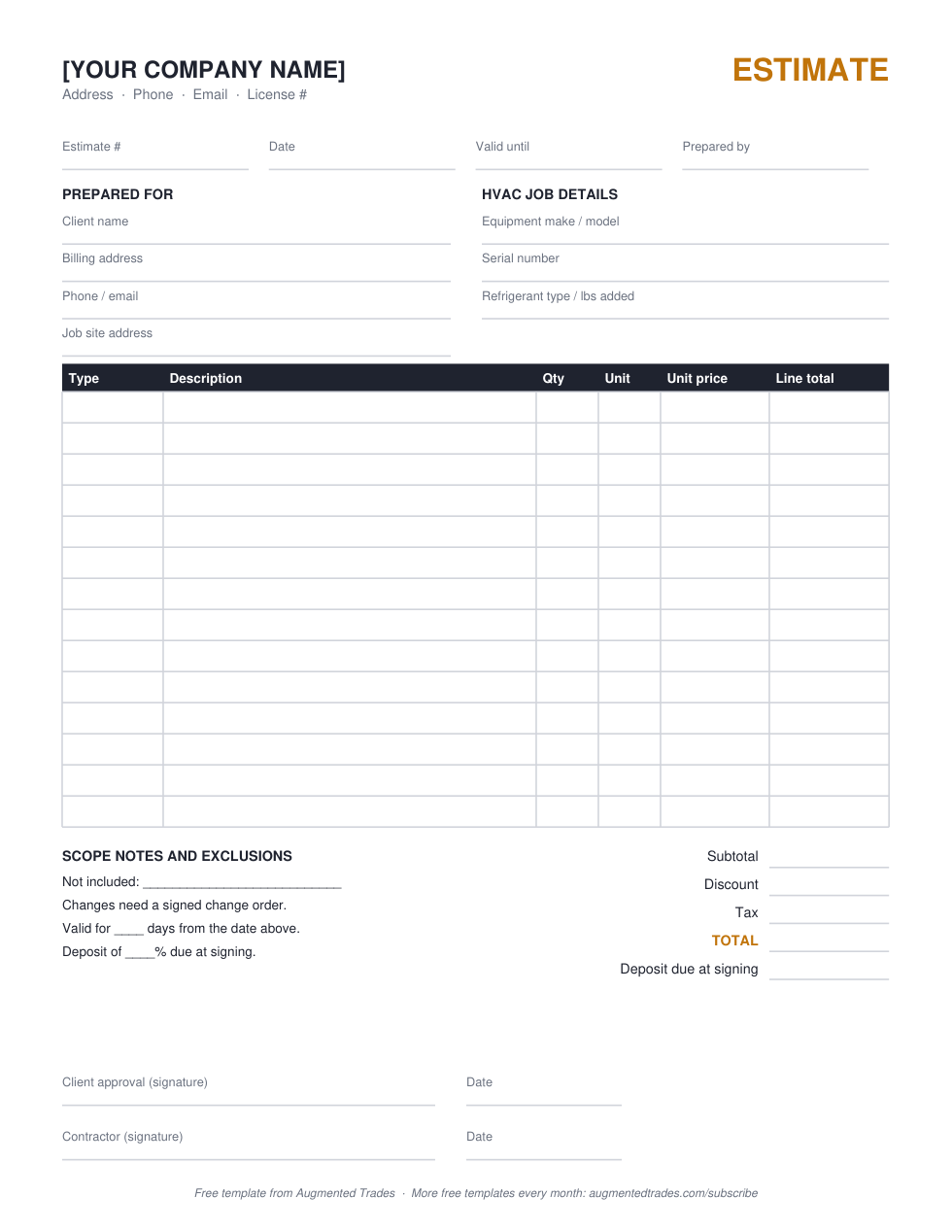
Download the PDF (free, print and fill) →
Want the editable version? The Excel files open in Excel or Google Sheets, with drop-down line types and automatic totals. Enter your email at checkout and download it instantly, free, no card.
The download includes all five trades (HVAC, plumbing, electrical, roofing, landscaping) plus a change order form. Tick the newsletter box at checkout and we will send you new trade templates as we publish them. It is optional.
What an HVAC invoice should include
- Your company details and license number, if your state requires it on billing documents.
- Invoice number, date, due date and job or PO number. Property managers and builders often won’t pay an invoice without their PO.
- Equipment make, model and serial number. You need them for warranty claims and your service history, and the homeowner needs them to register the equipment.
- Refrigerant type and amount added. It explains a big part of the bill on a leak or recharge call, and it gives you a record if the same system comes back.
- Service call or diagnostic fee as its own line, then parts and labor broken out.
- Maintenance agreement credits or discounts shown as a negative line, so members see the value.
- Payment terms and warranty: how to pay, when it’s due, and what the parts and labor warranty covers.
What an HVAC estimate should include
- Equipment specs: tonnage, efficiency rating (SEER2, AFUE or HSPF2), brand and model, so the homeowner can compare quotes like for like.
- Everything in the install: line set, pad, disconnect, thermostat, duct transitions, permit and haul-away. Missing items become arguments later.
- Options. Replacement estimates often show two or three equipment choices; copy the estimate sheet once per option.
- A valid-until date. Equipment prices move, so don’t leave a replacement quote open-ended.
- Exclusions, such as electrical upgrades, duct replacement or drywall repair, unless you priced them.
- Deposit and approval signature, so a yes becomes a scheduled job.
How to fill in the HVAC templates
- Replace the company block with your name, phone, email and license number.
- Fill in the client, the job site and the equipment fields.
- Overwrite the example rows: pick a line type (labor, material, equipment, subcontract or fee), then enter quantity, unit and unit price.
- Enter your tax rate and a discount if you give one. On the estimate, set the deposit percentage; on the invoice, enter any payment already received.
- Save as PDF and send it, or print the PDF version and fill it in on site.
Flat rate or time and materials?
The template works for both. For flat-rate pricing, put the task as one line with a quantity of 1 and your book price. For time and materials, list labor hours and parts separately. If you’re comparing the two, our markup vs. margin guide shows how to check that each price still leaves you a margin.
When to move from a template to HVAC software
A spreadsheet is fine while you’re sending a handful of estimates a week. Once you’re chasing unsigned quotes, re-typing the same equipment lines and matching payments by hand, field service software pays for itself. Start with our HVAC software guide, see HVAC estimating software for good-better-best proposals, and compare costs in our Jobber pricing and Housecall Pro pricing guides. If unsigned quotes are piling up, our HVAC CRM guide shows which platforms track open quotes.
HVAC invoice and estimate templates: common questions
Is this HVAC invoice template free?
Yes. The PDFs download directly from this page. The editable Excel versions are free too: enter your email at checkout and the download link arrives right away.
Does it work in Google Sheets?
Yes. Upload the .xlsx file to Google Drive and open it with Google Sheets. The formulas and drop-downs carry over.
Can I add my logo?
Yes. Insert your logo above the company name in Excel or Google Sheets. If you’d rather have a finished, branded proposal, the Branded Bid Proposal is built with your logo, colors and terms for $29.
What’s the difference between an HVAC estimate and an invoice?
An estimate is the price you propose before the work, with a valid-until date and an approval signature. An invoice bills for work done and shows what’s owed, what’s been paid and when the balance is due.
More free contractor templates
- Plumbing invoice and estimate templates
- Electrical invoice and estimate templates
- Roofing estimate and invoice templates
- Landscaping estimate and invoice templates
- Change order form and log
- Contractor bid proposal template
- Branded Bid Proposal with your logo ($29)
- Contractor markup vs. margin
Templates are free to use and edit for your own business. Example rows in the spreadsheets are placeholders, not price guidance. Nothing here is legal or tax advice: check your state’s rules for licensing numbers, sales tax on labor and contract requirements.
Answer a few quick questions and our free Tool Finder builds you a custom software shortlist — with the reasoning and pricing behind each pick.
Find your tools (free) →
Michael is the founder of Augmented Trades, an independent site that compares AI and software tools for trade contractors on published pricing, contracts, and real feature limits. Tools are recommended on fit for your shop — affiliate partnerships never decide coverage.