
Originally published May 1, 2026. Updated May 10, 2026 with verified pricing throughout.
Updated July 28, 2026: CompanyCam, Jobber, Housecall Pro and LeadTruffle were re-verified against their own pricing pages and all four had changed. CompanyCam replaced Pro/Premium/Elite with Core/Crew/Scale and dropped its three-user minimum; Jobber now sells tiers with users included; Housecall Pro publishes Essentials at $189/mo ($149 annual, 5 users included) and MAX at $329/mo ($299 annual, 8 users included); LeadTruffle no longer publishes pricing at all. Other vendors on this page still carry their earlier verification date.
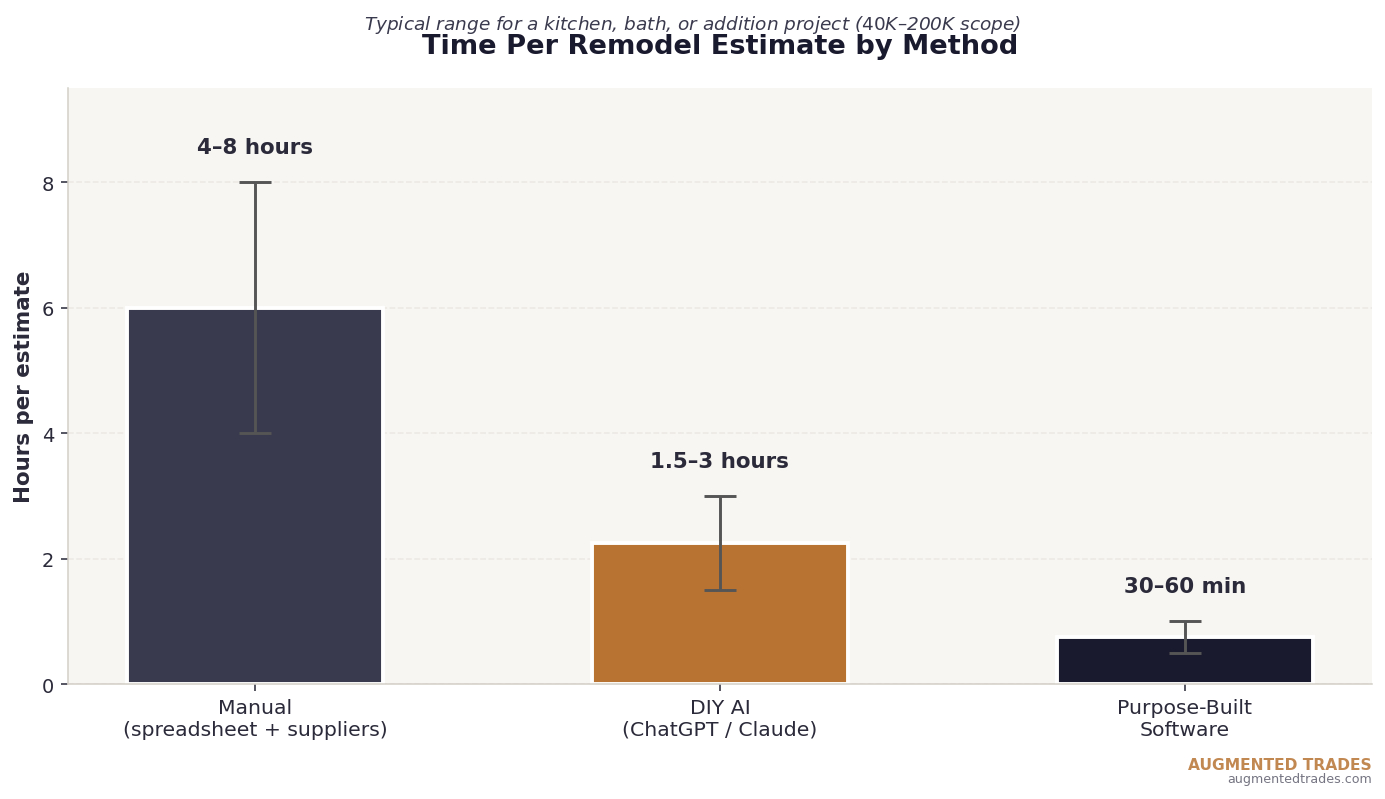
A residential remodel estimate is a different animal than a service trade quote. You’re not pricing one trade on one job — you’re pricing five or six trades, half a dozen allowance items, an unknown number of selections the homeowner hasn’t made yet, and a project timeline that’s almost certainly going to shift once demolition starts. Most remodelers spend four to eight hours building a single estimate for a meaningful project, and the margin on the entire job depends on getting it right.
AI changes the math here in ways that matter, but the right path depends entirely on the size and complexity of your business. This article walks through the two real options remodelers have in 2026 — DIY with ChatGPT or Claude, and purpose-built software — so you can pick the one that fits where your shop actually is, not where the marketing copy suggests you should be.
Why Remodel Estimating Is Harder Than Service Estimating
A plumbing service call has a known scope, known materials, and a labor estimate the owner can usually do in their head. A kitchen remodel has none of that. The scope evolves during the bid process. Materials include both line items you can price exactly and allowance items that won’t be selected for weeks. The labor estimate has to coordinate at least three trades, often more. And the homeowner is usually comparing your bid to two others, which means the time you spend estimating is competing against the time other contractors spend.
Five things make remodel estimates particularly slow:
- Multi-trade coordination. A bath remodel touches plumbing, electrical, drywall, tile, paint, and sometimes HVAC. Each trade’s hours and materials need pricing separately, then sequenced for the schedule.
- Allowance items. You can’t price the tile until the homeowner picks it. So you build in an allowance — a budgeted dollar figure — and document what’s included and excluded. If allowances are vague, you eat the difference.
- Selections and finishes. Faucets, lighting fixtures, cabinet hardware, paint colors, flooring grades. Each selection affects price. Most homeowners haven’t made these decisions when they ask for a quote.
- Scope creep. “While you’re in there, can you also…” Every remodel has this conversation. Pricing has to anticipate it without padding the estimate so much that the bid loses to a less-experienced competitor.
- Regional variability. A kitchen remodel in Connecticut prices differently than one in Texas. Material costs, permit requirements, labor markets, and inspection schedules all shift. Generic estimating tools don’t adjust for this; experienced estimators do.
The result: a meaningful remodel estimate that does the job right takes 4 to 8 hours of real work. Multiply that across a busy week of bids and you understand why most growing remodel shops hit a ceiling — the owner is the only person who can produce a winning estimate, and there are only so many hours in the day.
Path 1 — DIY: ChatGPT or Claude With a Structured Prompt
For solo remodelers and small shops doing two or three big estimates a week, a $20-per-month subscription to ChatGPT or Claude paired with a well-built prompt template handles a surprising amount of estimating work. The model isn’t replacing your judgment or your local pricing knowledge — it’s organizing the inputs and producing a structured starting point you can adjust.
The Remodeler’s Estimating Prompt
Save this as a saved prompt or text file. Fill in the blanks before pasting into ChatGPT or Claude.
Paste, fill in, send. You’ll have a structured first pass in two to three minutes. Add your local pricing knowledge, adjust the labor hours based on your actual crew speed, refine the allowance amounts, and you have a workable estimate in 1.5 to 3 hours total — versus the 4 to 8 hours of doing it from scratch.
What DIY Estimating Does Well for Remodelers
Three things in particular. First, the model is genuinely good at surfacing scope risks you might forget when you’re moving fast — the load-bearing wall question on a kitchen remodel, the asbestos test required on a 1970s bathroom demo, the structural beam that the 1960s addition is depending on. Second, the allowance recommendations are often a useful final check. Third, the model will write contract language for risk items that you can clean up and use, which is a chronic gap in most remodelers’ bid documents.
Cost: $20 per month. Time per estimate: 1.5 to 3 hours including your review and pricing adjustments.
Where DIY Falls Short
The model doesn’t know your local supply house pricing, your subcontractor markups, or how your crew actually performs. Every output needs an experienced remodeler’s review and significant pricing adjustment. It also doesn’t store anything — every job starts from zero, every customer record sits in your head or a separate spreadsheet, and there’s no path from “approved estimate” to “scheduled job” to “change order” to “paid invoice.”
For a solo or two-person remodel shop doing five or fewer big estimates a month, DIY is plenty. For a shop running multiple concurrent projects with crews, subcontractors, change orders, and selections to track, you’ll outgrow it within months.
A free middle option: for the material side of an estimate, Home Depot’s free AI material-list builder turns a project description or single-family blueprint into a priced material list in minutes — handy to test before you commit to paid software. Just remember it stops at materials; labor, margin, and the customer-facing proposal still need the tools below.
Path 2 — Done-For-You: Purpose-Built Software
When DIY estimating starts breaking down, three platforms cover most remodelers and custom home builders in 2026, plus two supporting tools that protect the estimate after it’s signed. Each fits a different shape of business.
Buildertrend — The Established Standard
Buildertrend is the dominant construction management platform for residential remodelers and custom home builders. The platform combines estimating, project management, scheduling, financial tracking, and client communication in one system. All plans include unlimited users, which becomes important fast as your team grows.
Public pricing isn’t published — Buildertrend requires a sales demo before quoting (re-verified Aug 2026; a 10% discount for annual prepay was being promoted at the time). Third-party reporting from CostBench, TrustRadius, Capterra, and contractor forums has historically placed plans anywhere from the mid-hundreds to four figures per month depending on tier, with onboarding fees of $400 to $1,500 typical — but treat any specific figure as a starting point for your demo conversation, not a quote.
For remodelers and custom home builders running multiple concurrent projects with full crews, Buildertrend has the deepest feature set in the residential construction space. The trade-off is cost and complexity. The learning curve is real — most shops budget 30 to 60 days to fully implement.
Best for: Established remodelers, custom home builders, shops with 5+ field workers, businesses running multiple concurrent projects with full subcontractor coordination needs.
JobTread — The Transparent Per-User Alternative
JobTread is the up-and-coming competitor to Buildertrend in the residential construction space. The pricing model is fundamentally different: $159 per month on annual billing for the first user, plus $18 per month for each additional internal user. Customer, vendor, and basic field portal users are free and unlimited. All features are included in the single plan — no tier-gating.
JobTread publishes a single tier — $199/month billed monthly or $159/month billed annually ($1,908/year) — plus $20/month per internal user, with tiered price breaks beginning after ten users (verified August 4, 2026). The math becomes less favorable for shops over 15 internal users, where Buildertrend’s flat-rate model starts to win on cost. For shops under that threshold, JobTread is typically the more affordable option with comparable estimating depth.
The estimating module gets consistently strong reviews — particularly the Cost Catalog (a reusable library of cost items that pre-populates new estimates), the on-screen takeoff capability, and the budget-to-actual tracking that flags overruns in real time.
Best for: Smaller remodel shops (3–15 internal users), contractors who want transparent flat per-user pricing, shops switching from spreadsheets that want a strong financial-tracking foundation.
CompanyCam — The Photo Documentation Layer
CompanyCam doesn’t do estimating directly, but it solves a chronic remodeler problem that destroys margin on every job: the “what was actually agreed to” dispute. Companycam captures, organizes, and tags every job site photo by address and date. Every photo is timestamped and geotagged. Six months into a project when a homeowner challenges a change order, you have the photo proving the existing condition before work started.
Pricing (re-verified July 28, 2026): Core $63/month on annual billing or $79/month monthly, including one user. Crew $119 annual or $149 monthly (3 users). Scale $249 annual or $299 monthly (3 users). No user minimum since the 2026 restructure. The platform integrates with both Buildertrend and JobTread, so the photos flow into your project management system automatically.
For remodelers specifically, the value isn’t in saving estimating time — it’s in protecting the estimate after it’s signed. A single avoided change-order dispute typically pays for the platform for several years.
Workyard — The Labor Cost Tracking Layer
Workyard sits in the same complementary category as CompanyCam, but solves a different chronic problem: most remodel estimates miss because labor was underestimated, and most labor estimates miss because the shop has no accurate historical data on how long its crew actually takes to complete specific tasks. Workyard’s GPS-verified time tracking captures that data automatically — every clock-in and clock-out is geofenced to a specific job site and tagged to a specific cost code, creating a labor-cost dataset that compounds in value with every project completed.
Verified May 2026 pricing: Time Tracking $6/user/month (annual) or $8/user/month (monthly), plus a $50 monthly company base fee. Workforce Management $13/user/month (annual) or $16/user/month (monthly), plus the same $50 base fee, with advanced scheduling, job costing reports, and priority support added.
Workyard integrates natively with QuickBooks, Sage, ADP, Gusto, and several other payroll and accounting platforms, so the labor data flows through to your books without double entry. For remodelers, the most important integration is the loop back into estimating: after 6 to 12 months of accurate labor data, you have empirical hour numbers for kitchen demos, bathroom rough-ins, and trim work that beat any guess you can make from memory. That’s the data that turns “I think this’ll take 80 hours” into “based on the last six similar projects, this will take 92 hours plus or minus 8.”
Best for: Remodelers who want to stop guessing on labor estimates, shops with crews working across multiple sites, businesses where payroll accuracy and job costing matter more than the lowest-cost time clock.
Houzz Pro — The Design-Forward Alternative
Houzz Pro is worth a brief mention for design-build remodelers. When we read the vendor page on August 3, 2026, plan pricing was demo-quoted (Pro, Custom and Enterprise tiers scoped by annual project volume, $60/month per additional user). Updated October 12, 2026: Houzz Pro now publishes its prices — Design $99/month (1 user), Pro $199/month (1 user) and Teams starting at $399/month (unlimited users), with additional users on the single-user plans at $50/month each; advertising packages still start at $499/month. Figures are as shown on the vendor’s pricing page on that date; the page displays per-month prices and no annual-billing toggle. The platform’s strength is the design-presentation side — homeowner-facing project visualization, integrated showroom selections, and lead generation through Houzz’s homeowner audience. Estimating itself is solid but not the deepest feature; if estimating is your primary need, Buildertrend or JobTread are better fits.
Best for: Design-build remodelers, shops where the homeowner experience and visual presentation are core differentiators, businesses already getting leads through Houzz’s homeowner platform.
Pricing Reality at a Glance
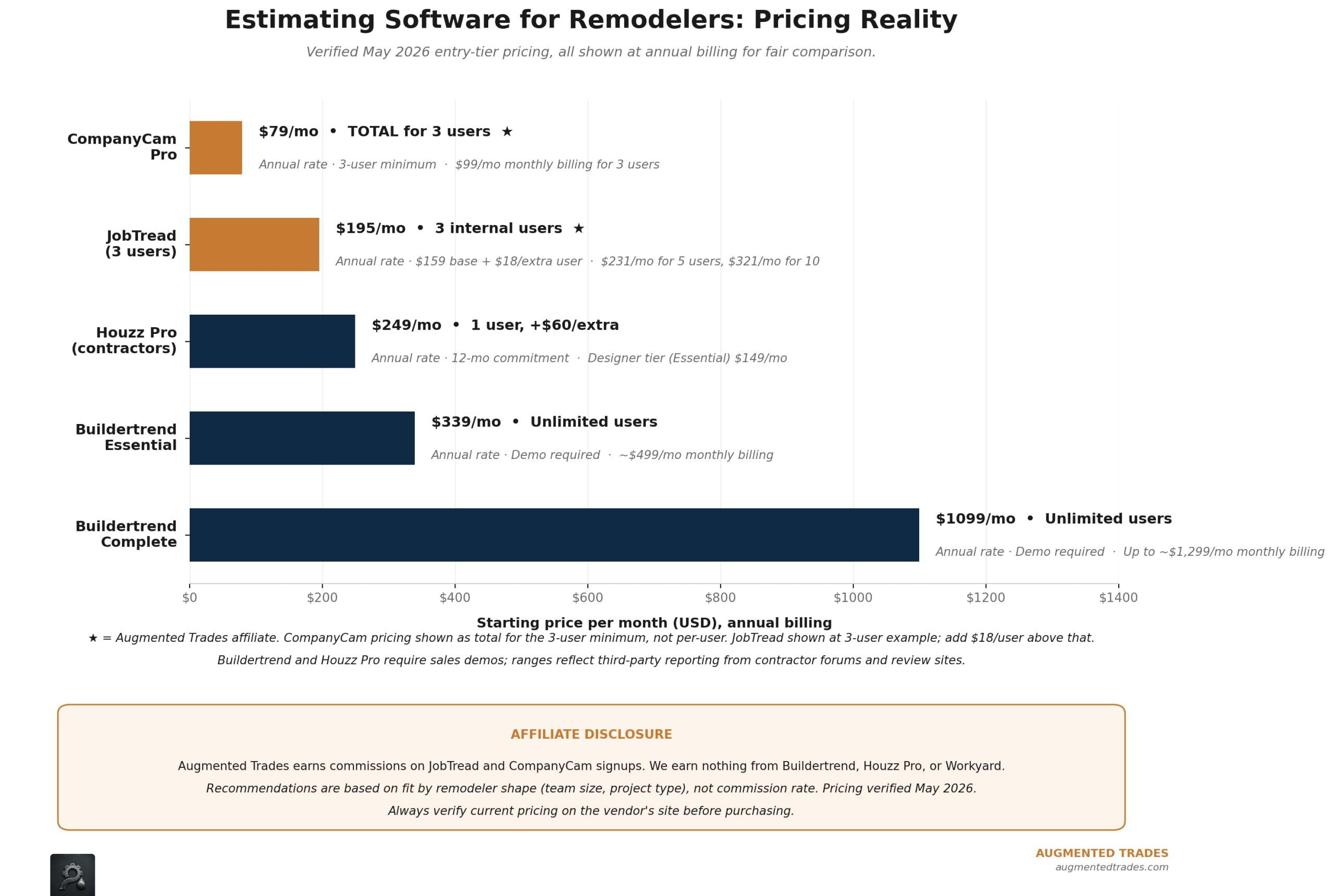
Worth flagging: Buildertrend’s public pricing is opaque by design, and contractor forums consistently report that listed third-party prices understate what shops actually pay once onboarding fees, transaction fees on Buildertrend Bill Pay, and tier upgrades are factored in. Get a written quote with all fees disclosed before signing anything. JobTread’s pricing model is genuinely transparent — what you see is what you pay.
How to Choose
Pick the platform that fits your current shape, not the shape you imagine in two years.
Solo remodeler or two-person operation. Start with the DIY prompt. Twenty dollars a month, two to three hours per estimate, and you keep your existing process for everything else. Revisit when you hire your first project manager or office person.
3–15 internal users, smaller projects, want transparent pricing. JobTread is the strongest fit. The per-user math wins at this team size, the all-features-included pricing avoids tier upgrade pressure, and the estimating module is comparable to Buildertrend’s at a meaningfully lower cost.
15+ internal users, multiple concurrent projects, custom home building scope. Buildertrend’s flat-rate model starts to win on cost at this team size, and the platform’s depth on subcontractor coordination, warranty management, and financial complexity matches what larger custom builders actually need.
Design-build remodeler with homeowner-facing presentation as a differentiator. Houzz Pro is worth evaluating, particularly if you’re already getting leads through Houzz.
Any shop concerned about change-order disputes and documentation. Add CompanyCam regardless of which estimating platform you choose. The math on a single avoided dispute pays for several years of subscription.
Any shop where labor estimates have been missing. Add Workyard. After two quarters of accurate labor data flowing back into your estimates, you’ll have historical numbers that beat memory-based guesses on every project type you handle.
A useful tell: count your last 12 months of completed projects. How many had at least one significant change-order dispute that ate into margin? More than two — you need CompanyCam yesterday. How many came in over labor budget by 10% or more? More than three — you need Workyard. How many of your estimates last quarter took more than 6 hours to build? More than three — you’ve outgrown DIY estimating and software will pay for itself.
The Bottom Line
AI-powered remodel estimating in 2026 is no longer hypothetical. The DIY path with ChatGPT or Claude is real and works well for small shops today — particularly the prompt template approach, which handles the structural complexity of remodel estimates better than freeform AI use. The done-for-you path with Buildertrend, JobTread, CompanyCam, Workyard, or Houzz Pro is mature, fully-featured, and worth the monthly cost once project volume and team size justify it.
The mistake most remodelers make is staying on spreadsheets six months past the point where they’ve clearly outgrown them — or jumping straight to a top-tier enterprise platform when their team would have done fine on a per-user alternative for half the cost. The right tool depends on where your business actually is.
For a broader look at the rest of the AI tool stack for remodelers and custom home builders, see our pillar guide on the best AI tools for remodelers and custom home builders in 2026. And if you’re a remodeler who also subs out plumbing scopes, our companion piece on AI estimating for plumbers covers how the trades coordinating with you are using these same tools on their side of the bid.
Quick Links: Every Tool Reviewed
ChatGPT
General-purpose AI for paste-prompt-get-estimate workflows
Best for: Solo remodelers and two-person shops doing 2–3 big estimates per week. Use the remodeler’s estimating prompt in this article to surface scope risks, allowance recommendations, and contract language for risk items. Cuts estimate time from 4–8 hours to 1.5–3 hours with your review.
(Free tier works for basic use; Plus unlocks better reasoning)
Claude
Alternative AI assistant from Anthropic
Best for: Remodelers who want a second AI option for the same DIY workflow. Strong at structured outputs, long-context document analysis, and writing contract language. Many remodelers run both and pick whichever produces better output for a given estimate type.
(Free tier also available)
Buildertrend
The established standard for residential construction management
Best for: Established remodelers and custom home builders with 15+ internal users, multiple concurrent projects, and full subcontractor coordination needs. Flat-rate pricing wins at this team size. 30-60 day implementation curve is real — budget for it.
10% off annual prepay promo · Unlimited users on all tiers
JobTread
Transparent per-user pricing alternative to Buildertrend
Best for: Smaller remodel shops (3–15 internal users), contractors who want transparent flat per-user pricing, shops switching from spreadsheets. Cost Catalog, on-screen takeoff, and real-time budget tracking get consistently strong reviews. The per-user math wins under 15 users.
$199/mo monthly + $20/user (additional)
Customer/vendor/field portal users are FREE
Houzz Pro
Design-forward platform with homeowner-facing presentation
Best for: Design-build remodelers where homeowner experience and visual presentation are core differentiators, shops already getting leads through Houzz’s homeowner platform. Estimating is solid but not the deepest feature — this is a sales-forward tool first, estimating tool second.
+$60/mo per additional user (published)
Volume-sconth commitment
CompanyCam
Photo documentation that ends change-order disputes
Best for: Remodelers running concurrent multi-week projects where change-order disputes are common. Captures, organizes, and tags every job site photo by address and date. A single avoided change-order dispute typically pays for several years of subscription.
Crew $119 · Scale $249 annual — 3 users
No user minimum since the 2026 restructure
Workyard
GPS labor tracking that feeds historical data back into estimates
Best for: Remodelers where labor estimates have been missing — meaning estimates come in over budget by 10%+ on more than 3 of the last 12 projects. After 6–12 months of accurate labor data, you have empirical hour numbers for kitchen demos, bathroom rough-ins, and trim work that beat memory-based guesses.
Workforce Mgmt $13-$16/user/mo + $50/mo base
(annual/monthly billing)
The Augmented Trades Recommended Path by Remodeler Shape
Affiliate disclosure: Augmented Trades earns no commission on any tool recommended on this page — every vendor here is linked directly. We earn nothing from Buildertrend, Houzz Pro, Workyard, ChatGPT, Claude — they’re included because they’re best-in-class for the specific use cases described, CompanyCam, or regardless of commission structure. Pricing was verified May 2026 from each vendor’s published pricing page or third-party reports where vendors don’t publish (Buildertrend). We make no ROI or savings claims that aren’t directly tied to a cited source. Always verify current pricing on the vendor’s site before purchasing.
Want the prompts we use?
We turned our research into a 25-prompt pack for trade contractors — for estimates, client communication, proposals, and business operations. Copy, paste, adapt. Save hours every week.
More estimating guides for the trades: AI estimating for electricians · AI estimating for HVAC contractors · HVAC estimating software compared · plumbing estimating software compared
Affiliate disclosure: Augmented Trades participates in affiliate programs and may earn a commission when you sign up through links on this page, at no additional cost to you. We never accept payment for placement or rankings. We earn affiliate commissions on some links, and those never change which tool wins a category. See our full affiliate disclosure.
Related: AI estimating for landscapers
Answer a few quick questions and our free Tool Finder builds you a custom software shortlist — with the reasoning and pricing behind each pick.
Find your tools (free) →
Michael is the founder of Augmented Trades, an independent site that compares AI and software tools for trade contractors on published pricing, contracts, and real feature limits. Tools are recommended on fit for your shop — affiliate partnerships never decide coverage.