
Where AI actually helps landscape contractors price work — and where the marketing oversells.
Prices as of November 6, 2026, read from each vendor’s own pricing page (Housecall Pro: Landscaping pricing path, November 9, 2026; LMN: October 19, 2026; Jobber: November 5, 2026). Updated November 6, 2026: GreenMargins now starts at $47/month, Jobber’s team pricing corrected, and time-savings and cost figures we could not source removed.
The real cost-leak problem
Most landscape contractors don’t lose money because they price materials wrong. They lose money because labor burden, travel time, equipment wear, and overhead allocation never make it into the bid. Those costs exist on every single job. They just don’t show up until the books close at the end of the quarter.
A spreadsheet quote can look profitable on paper and lose money in practice — not because the markup was wrong, but because the cost base it was marked up against was incomplete. Labor burden alone (workers comp, payroll taxes, vacation, benefits) adds a real percentage on top of the base hourly wage, and most homemade spreadsheets either omit it or apply it as a flat fudge factor that doesn’t match reality.
This article breaks down what landscape estimating actually requires in 2026, what AI can and can’t do for it, and which tools are worth the money for your business size — whether or not we earn a commission on them.
What “AI estimating” actually means for landscapers
There are three distinct steps in a landscape bid, and the words “estimating,” “quoting,” and “takeoff” get used interchangeably:
- Takeoff — measuring quantities (square feet of turf, linear feet of edging, count of plants) either from plans or a site visit.
- Estimating — calculating internal costs (labor, materials, overhead, equipment, travel) to know your break-even.
- Quoting — building the customer-facing proposal with your final price.
Most contractors only do one or two of these well. The cost leak shows up because the estimating step gets skipped entirely — people jump from a rough takeoff to a quote based on gut feel and last year’s pricing.
AI’s role here is narrow but real. It’s not replacing your judgment about what a job should cost. It’s catching the costs you’d otherwise forget to include.
Path 1: DIY — AI + Spreadsheets
For solo operators and 1–2 crew shops without budget for industry-specific software, the DIY stack works if you have the discipline.
The stack:
- ChatGPT or Claude ($0–$20/month) for prompts that walk through estimating logic, generate proposal language, and convert a plant list into a priced bid
- Google Maps measurement for property square footage (free)
- A spreadsheet template with built-in overhead recovery formula
What AI can do here:
- Take a list of materials and quantities and produce a clean line-item estimate
- Generate professional proposal language from a few bullet points
- Walk you through labor burden math step-by-step the first few times until you internalize the formula
- Catch obvious omissions (“you didn’t include disposal costs for the existing sod removal”)
What AI can’t do here:
- Know your local labor burden rate (you have to provide this)
- Know your overhead structure (rent, insurance, truck payments, office costs)
- Know your equipment depreciation
- Know your local material prices
The cost-leak problem doesn’t disappear with AI. It disappears with discipline about including labor burden, travel, equipment, and overhead in every estimate. AI can structure the calculation. You still have to know your numbers.
When DIY works:
- Solo operator
- Under 50 estimates per year
- You already know your real cost structure
- You want to look more professional and produce cleaner estimates
When DIY breaks down:
- Multiple crew leads bidding work, leading to inconsistent pricing
- No historical job-cost data to learn from
- Estimates that look profitable on paper but lose money in practice
If you’re nodding along to that second list, the DIY path isn’t where you should be. Move to the next section.
Path 2: Done-For-You — Industry-Specific Software
Five tools dominate the landscape estimating conversation in 2026, and they don’t compete with each other so much as serve different business sizes.
Platform What the vendor publishes Billing basis Source GreenMargins From $47/mo; free plan after the 14-day trial (greenmargins.com, November 6, 2026). Monthly greenmargins.com Housecall Pro Basic $79/mo (1 user) · Essentials $189/mo (5 users included) and MAX $329/mo (8 users included, +$35/user), monthly; no annual rate renders; prices vary by trade (Landscaping pricing path, read November 9, 2026) Both housecallpro.com Jobber Grow $199/mo (1 user) to $399/mo (10 users); Core from $49/mo, Plus to $699/mo (15 users); monthly billing, read October 15, 2026. Extra users $29/mo each (checked November 5, 2026). Month-to-month getjobber.com LMN Starter $297/mo (1 office + 5 crew licenses) · Professional $648/mo (3 office + 15 crew) · Enterprise quote (100+ users). Plus a one-time onboarding fee the vendor does not publish. Monthly granum.com/lmn Aspire Quote only — no public pricing. Quote youraspire.com Vendor prices change without notice. For the current verified figures on every vendor we track — read from each vendor’s own pricing page and dated — see the contractor software pricing tracker.
Prices as of November 6, 2026 (dates per vendor in the note at the top). Aspire quotes every deal and publishes no rates. LMN’s published prices exclude a one-time onboarding fee, so its real first-year cost is higher than the monthly figure suggests.
Jobber · Housecall Pro · GreenMargins · LMN · Aspire.
GreenMargins — from $47/month
The newcomer built around the exact cost-leak problem above. GreenMargins does job costing and overhead recovery for small to mid-size landscape contractors. It’s not a full FSM platform: it doesn’t schedule, dispatch, or invoice. It does one thing: calculate what a job actually costs you, including the labor burden, travel time, equipment and overhead allocation that spreadsheets miss. Its site lists paid plans from $47/month, a 14-day free trial with no credit card required, and a free plan after the trial ends (checked November 6, 2026).
Best for: Solo operators and 1–3 crew shops who want estimating accuracy without paying for full FSM features they won’t use.
Jobber — $299–$399/month (team plans)
A widely used generalist FSM in home services, and a reasonable fit for landscape maintenance shops. Grow is $299/month for 5 users and $399/month for 10 users on monthly billing, and extra users are $29/month each (checked November 5, 2026). Honest limitation: Jobber creates clean quotes and invoices, but it doesn’t compute labor burden, overhead allocation, travel cost or equipment depreciation. It’s a quoting and scheduling tool, not an estimating tool. Many contractors use Jobber alongside a dedicated estimating tool: Jobber for scheduling and client communication, GreenMargins or LMN for the actual cost build.
Best for: Residential maintenance shops focused on recurring services (weekly mowing routes, seasonal contracts) where the bid math is simpler and route optimization matters more.
Housecall Pro — $79–$329/month
Another generalist FSM, residential focus. Basic is $79/month, Essentials is $189/month (5 users) and MAX is $329/month (8 users), month-to-month; no annual rate renders on its pricing page. Slightly stronger built-in marketing than Jobber, slightly weaker on the field-service core. Same fundamental limitation as Jobber: it’s a scheduling and quoting tool, not a cost-build tool.
Best for: Lawn care plus other home-services mix where unified marketing matters.
LMN — $297–$648/month*
The gold standard for green-industry-specific software. Starter starts at $297/month for companies with fewer than 10 employees (1 office/crew lead license and 5 crew member licenses). Professional starts at $648/month (3 office/crew lead and 15 crew member licenses). Enterprise is custom. LMN’s budget-based estimating system forces you to account for labor, materials, equipment, and overhead before sending a quote. If your margins are a mystery, LMN fixes that. The catch is the price — at $297/month you need enough volume that the time savings and margin recovery justify the cost.
*Prices from LMN’s own pricing page, read October 19, 2026: “starting at” monthly prices in USD, after a one-time onboarding fee. Additional licenses cost extra. Confirm current pricing with the vendor.
Best for: Established 3–15 crew operations that have outgrown spreadsheets and want one platform that does estimating, scheduling, and crew management.
Aspire — Custom pricing only
Built for larger, multi-crew landscape companies. Aspire includes PropertyIntel for aerial measurement and is sold on custom pricing only; its pricing page was unavailable when we checked on November 6, 2026, and it has never published plan prices. Plan for a real implementation project and get the onboarding cost in the quote.
Best for: Multi-branch landscape operations with $1M+ revenue and a dedicated implementation lead.
Which one fits your business?
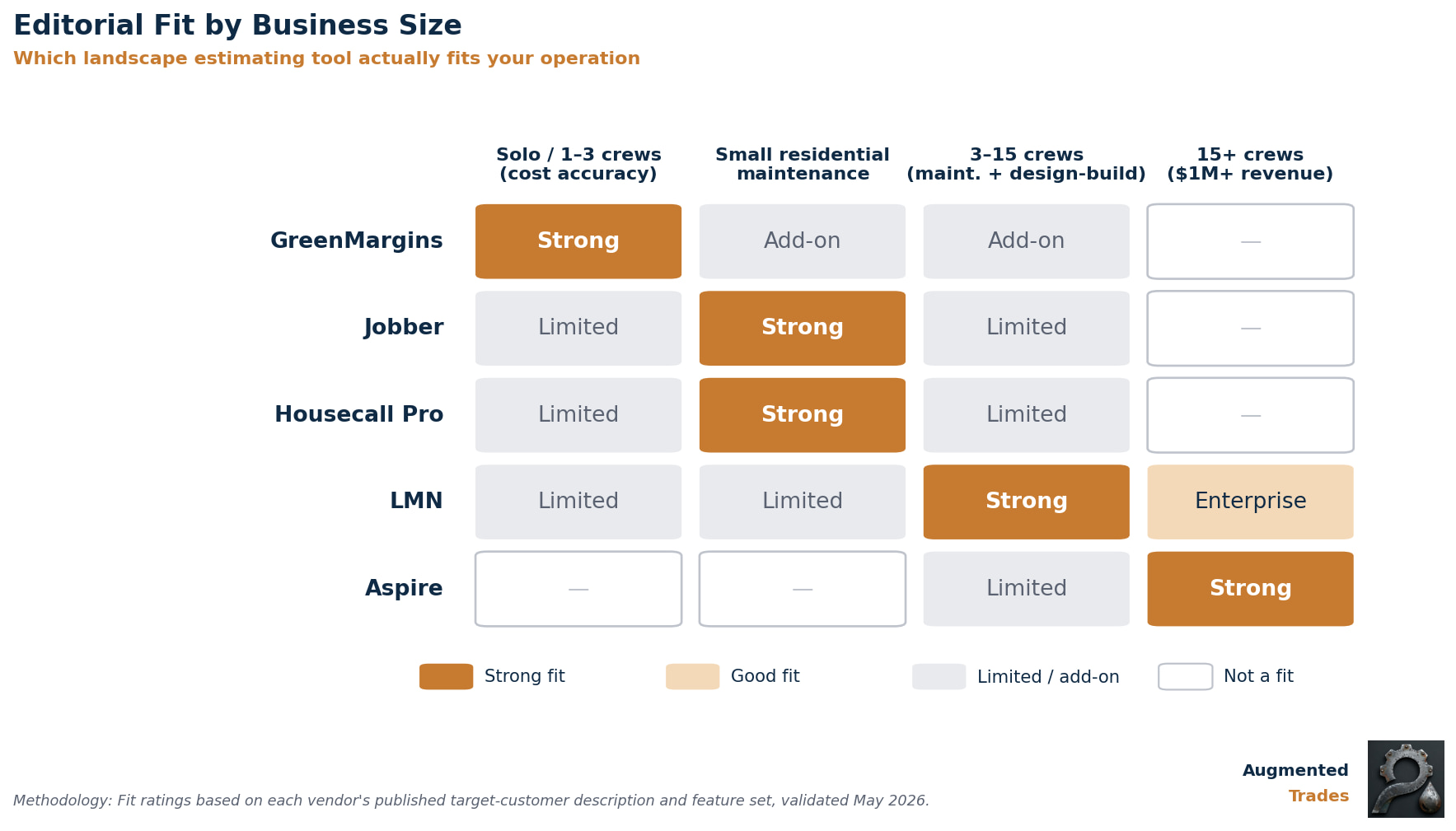
The honest verdict, ignoring affiliate dynamics:
- Solo / 1–3 crews focused on cost accuracy: GreenMargins. The cheapest option that actually solves the underestimation problem.
- Solo / small residential maintenance: Jobber or Housecall Pro. You don’t need full job costing — you need fast scheduling, recurring billing, and clean client communication. Add GreenMargins separately if margin is hurting.
- 3–15 crews / mixed maintenance and design-build: LMN. The price is real, but so is the green-industry depth.
- 15+ crews / $1M+ revenue: Aspire if you can absorb the implementation curve. LMN Enterprise if you want lighter setup.
What AI actually adds to landscape estimating
Stripping the marketing language: AI’s real role in landscape estimating today is narrower than the vendor pitches suggest. Three places where it earns its keep:
Aerial measurement. Aspire’s PropertyIntel module and standalone tools like SiteRecon use aerial imagery to measure properties without a site visit, which saves a trip for design-build and commercial bids. See our property measurement comparison for current pricing.
Live material cost lookup. Platforms that connect to supplier pricing can pull current material costs into the estimate, so your bid reflects what materials cost this week rather than the last time you priced this kind of job. Ask each vendor which suppliers it connects to in your area.
Proposal language generation. ChatGPT-style tools take a structured estimate (line items, quantities, prices) and produce a customer-facing proposal in minutes instead of hours. This is the most accessible AI win for any landscaper, regardless of which estimating tool you use.
Historical job-cost analysis. Platforms with job-costing history, such as LMN and Aspire, let you compare a new estimate against similar jobs you’ve already completed. This is where software earns its keep: not generating estimates from scratch, but catching when a new estimate looks out of line with your own history.
What AI does not do, despite what some marketing suggests:
- Replace your knowledge of local labor markets
- Know your equipment costs without you telling it
- Estimate plant survival rates or seasonal pricing accurately
- Generate accurate bids from photos alone (the technology isn’t there yet for landscape work)
FAQ
Can ChatGPT write landscaping estimates? ChatGPT can structure an estimate from inputs you provide (quantities, your labor rate, your material prices), generate professional proposal language, and walk you through the math of labor burden and overhead allocation. It cannot tell you your local labor rates, your overhead structure, or current material prices in your market. Treat it as a calculator and writing assistant, not a pricing oracle.
What’s the cheapest landscape estimating software? GreenMargins, from $47/month (with a free plan after its trial), is the cheapest dedicated estimating tool here with full job costing (labor burden, overhead, equipment, travel). Jobber Core at $49/month and Housecall Pro Basic at $79/month don’t calculate your costs; they format quotes around prices you provide.
Is LMN worth it for a 2-person crew? For most 2-person crews, probably not. LMN’s Starter plan starts at $297/month (plus a one-time onboarding fee) and is built for companies with fewer than 10 employees, so the value depends on whether you’re doing enough volume to justify the cost. A small crew that mainly needs job costing can start with GreenMargins plus a generalist FSM like Jobber, and move to LMN once estimating volume and crew count grow.
Aspire vs LMN: which is better for landscaping? Different tools for different sizes. Aspire is built for larger, multi-crew landscape companies, with custom pricing and a longer implementation. LMN serves smaller shops with industry-specific estimating that’s faster to deploy and publishes starting prices. If you’re a growing small-to-mid shop, start with LMN; if you’re a large multi-branch operation willing to invest in implementation, get an Aspire quote.
Quick Links: Every Tool Reviewed
GreenMargins
Job costing for solo and small crew shops
Best for: Solo operators and 1–3 crew shops focused on cost accuracy. Calculates labor burden, travel, equipment, and overhead allocation that spreadsheets miss. Not a full FSM — doesn’t schedule, dispatch, or invoice. Pairs naturally with Jobber.
14-day free trial · no credit card required
(greenmargins.com, Nov 6, 2026)
Jobber
Generalist FSM for residential maintenance routes
Best for: Residential maintenance shops doing recurring routes and seasonal contracts. Strong scheduling, recurring billing, route optimization, clean quotes. Honest limit: doesn’t compute labor burden, overhead, or equipment depreciation — pair with GreenMargins if margin discipline matters.
Teams: Grow $299 (5u) · Plus $499 (5u) / $599 (10u) / $699 (15u)
Extra users $29/mo each · annual billing costs less
Housecall Pro
Marketing-first FSM for lawn care & home services mix
Best for: Lawn care plus other home-services mix where unified marketing matters. Stronger built-in marketing automation than Jobber. Same scheduling/quoting strengths — and same cost-build limit: it doesn’t calculate true job costs internally.
(monthly billing; no annual rate shown)
LMN
Gold standard for green-industry-specific operations
Best for: 3–15 crew operations mixing maintenance and design-build. Budget-based estimating forces full cost accounting before you send a quote. If margins are a mystery, LMN fixes that.
Professional from $648/mo (10+ employees)
Enterprise: quoted · plus a one-time onboarding fee (LMN pricing page, Oct 2026)
Aspire
Enterprise landscape platform for $1M+ operations
Best for: Multi-branch landscape operations with $1M+ annual revenue and a dedicated implementation lead. Deep SiteOne and PropertyIntel integrations. Plan for a real implementation project.
Pricing page unavailable Nov 6, 2026
Quote required
ChatGPT
Cheapest entry to AI-assisted estimate logic and proposals
Best for: Solo operators doing under 50 estimates/year who already know their cost structure. Walks you through labor burden math, structures line-item estimates from inputs you provide, generates customer-facing proposal language. Treat as a calculator, not a pricing oracle.
ChatGPT Plus $20/mo
Claude
Alternative AI assistant from Anthropic
Best for: Landscapers who want a second AI option. Strong at structured outputs, long-context documents, contract language, and customer correspondence. Many contractors run both and pick whichever produces better output for a given task.
Claude Pro $20/mo
The Augmented Trades Recommended Stack by Business Size
Affiliate disclosure: Augmented Trades earns commissions when readers sign up for Jobber and Housecall Pro through our links. We earn nothing from LMN, Aspire, GreenMargins, ChatGPT or Claude; they’re included because they fit specific landscape businesses, regardless of commission. Prices were read from each vendor’s own pricing page (dates in the note at the top). Always confirm current pricing on the vendor’s site before you buy.
Related Reading
- AI Estimating for Remodelers and Custom Home Builders: DIY Prompts vs. Software (2026) — for design-build landscapers who want to see how remodelers approach the same problem
- AI Estimating for Plumbers (2026) — same Jobber/Housecall Pro FSM crossover, deeper FSM comparison
- AI Estimating for HVAC Contractors (2026) — covers ServiceTitan-tier comparison for higher-revenue operations
- JobTread’s New AI Platform (2026) Practical AI Budgeting for Contractors — tool-level deep-dive on AI estimating mechanics
Answer a few quick questions and our free Tool Finder builds you a custom software shortlist — with the reasoning and pricing behind each pick.
Find your tools (free) →
Michael is the founder of Augmented Trades, an independent site that compares AI and software tools for trade contractors on published pricing, contracts, and real feature limits. Tools are recommended on fit for your shop — affiliate partnerships never decide coverage.