
A buyer’s guide segmented by GC size — small (<$500K), mid ($500K–$3M), and large ($3M+). Plus the six operational categories where AI actually moves the needle, and the ones where the marketing is ahead of the reality.
Originally published May 12, 2026. Updated May 26, 2026: corrected Procore pricing methodology (ACV-based, not per-user); clarified JobTread AI Connector launch date and softened “first in construction software” claim to defensible language; added Knowify use-case clarity; verified third-party pricing sources directly; updated Large GC stack range to reflect realistic Procore ACV pricing.
Not sure which tools fit your shop?
Answer seven quick questions and get a stack matched to your trade, size, and budget — every pick traces to published vendor pricing we’ve verified, and several of our recommendations earn us nothing. Try the free Tool Finder →
The GC software problem in 2026
Updated October 12, 2026: every vendor figure on this page was re-read from the vendor’s own pricing page on October 12, 2026. What moved since the July 27 pass: Jobber’s Grow tier is $199/mo for one user but $299/mo with five users included (the earlier “$199 for 5 users” was wrong); JobTread’s annual per-user rate is $16, not $18; CompanyCam Scale is $249/mo billed annually ($299 monthly) and Crew is $119/mo annually ($149 monthly); Buildertrend still publishes no prices; Service Fusion now quotes every plan (the $245–$627 figures came from hidden page code, not the rendered page, and have been removed); Houzz Pro now publishes prices (Design $99, Pro $199, Teams from $399); NiceJob’s entry plan is now called Starter; LeadTruffle’s page no longer mentions an onboarding fee; ChatGPT’s Team plan is now sold as Business at the same $25 per seat monthly. Housecall Pro figures are from its General Contractor pricing path (Essentials $189/mo, $149 annual, 5 users; MAX $329/mo, $299 annual, 8 users) — Housecall Pro shows different prices to different trades.
Choosing general contractor software is the hardest software decision in the trades. A plumber needs an FSM. A roofer needs aerial measurement plus a CRM. A landscape contractor needs estimating plus scheduling. Each of those is a relatively contained problem with a few mature solutions. If crews-to-jobs routing is the bottleneck, our field service dispatch software guide compares the dispatch boards head-to-head.
A GC needs all of that, plus subcontractor coordination, plus a client portal, plus job costing across months-long projects, plus bid management, plus document control. No single tool does all of it well. The platforms that try (Buildertrend, JobTread, Procore) each make different compromises. The platforms that don’t try (Jobber, Housecall Pro) work great until your projects get past 30 days.
This is what makes AI both more interesting and more dangerous for GCs than for any other trade. More interesting because AI can compress the parts of GC work that are language-heavy — proposals, change order narratives, sub outreach, client updates. More dangerous because the vendor pitches around “AI-powered project management” oversell what’s actually available today.
This article cuts through that. Three GC size tiers, six operational categories, and an honest read on which tools actually fit at each size — whether we earn a commission on them or not.
The three GC size tiers
Software fit depends more on revenue and project complexity than on employee count. A two-person remodeler doing $1.2M of high-end custom kitchens has a different software need than a fifteen-person framing crew doing $1.2M of production tract work. But for the purposes of this article, here’s the structure:
Small GCs: Under $500K annual revenue, 1–3 simultaneous projects, owner-operator plus 1–3 staff (often a mix of W2 and 1099). Typical buyer is owner-as-PM. Software budget realistically $0–$300/month total.
Mid GCs: $500K–$3M annual revenue, 3–10 simultaneous projects, 5–15 staff including office support. Typical buyer is owner plus a dedicated PM or office manager. Software budget realistically $300–$1,000/month.
Large GCs: $3M+ annual revenue, 10+ simultaneous projects, 15+ staff including dedicated estimators, PMs, and bookkeeping. Software budget realistically $1,000–$5,000+/month including integrated accounting.
These cutoffs aren’t rigid. A growing $400K GC who knows they’ll cross $500K this year should evaluate Mid-tier tools. A $4M GC who runs lean with subs and minimal office overhead might be better served by Mid-tier tools than Large. But the framework holds: pick the tier that matches your operating complexity, not your revenue alone.
The best tools for contractors 2026: six categories that matter
What AI changes in GC operations today is narrower than the marketing suggests. These six categories are where it earns its keep:
- Estimating & pre-construction — proposal language, line-item logic, historical job analysis
- Project management & scheduling — task generation from notes, change order documentation
- Client communication & portal — weekly update drafting, FAQ response automation
- Subcontractor management & bid management — outreach drafting, bid comparison
- Job costing & financial control — variance flagging, anomaly detection
- Lead generation & marketing — response automation, review generation, ad copy
Each category gets a tier-by-tier breakdown below. The honest framing throughout: AI helps where language and pattern-recognition help. It doesn’t replace judgment, oversight, or the math of cost vs. estimate.
Augmented Trades Newsletter
Honest AI tool reviews for trade contractors
No fluff, no hype, no recycled marketing copy. Just what’s worth the money for shops your size — and what to skip. Every Monday.
Free forever. Unsubscribe anytime.
1. Estimating & Pre-Construction
The job: Turn a scope of work into a defensible number that protects your margin without scaring the client. This is where most GCs win or lose the year — a 5% miss on estimating in a high-volume year costs more than every other operational inefficiency combined.
Where AI helps: Proposal language is the obvious one. Given a basic scope (“kitchen remodel, 12×14, full demo, cabinet replacement, granite counters”), AI tools can generate professional proposal language, scope-of-work narratives, and inclusion/exclusion lists that read like a senior estimator wrote them. Saves 30–60 minutes per proposal and produces consistent quality across estimators.
Where AI doesn’t help yet: AI cannot know your local subcontractor pricing, your current lumber costs, or your overhead structure. Every published “AI estimating” tool that claims otherwise is overselling — either pulling from outdated training data or requiring you to feed it the numbers it then formats. The “AI-generated estimate” is really a human-generated estimate with AI-generated wording.
Small GC ($500K and under): Jobber + ChatGPT Plus
Honest answer for a small GC: you don’t need construction-specific estimating software yet. Jobber’s quote tool combined with ChatGPT Plus ($20/month) for proposal language generation will get you 80% of what JobTread or Buildertrend offers, at a tenth of the cost.
Jobber starts at $49/month for Core (one user). Grow is $199/month for a single user and $299/month for a 2–5-person team with five users included, billed monthly; annual billing runs up to 25% lower (read October 12, 2026). Strong quoting, scheduling, and customer communication. Honest limitation: Jobber’s job costing is basic compared to construction-specific platforms — for projects under 30 days, that’s fine. For 90+ day projects, it’ll start breaking down.
When to outgrow this: when you have more than 2 active projects exceeding 30 days, OR when you’re hiring an office manager. That’s the signal to evaluate Mid-tier construction platforms.
Mid GC ($500K–$3M): JobTread, Projul, or Buildertrend
This is the hardest tier to advise because the three dominant tools each make a different compromise.
JobTread ($199/month + $20/user) is the fastest-growing GC platform. Reached 10,000 customers in February 2026. Built around an open API, JobTread launched its AI Connector in April 2026 — a Model Context Protocol (MCP) server that lets contractors connect their JobTread account directly to AI tools like ChatGPT and Claude. This is among the first MCP-based integrations from a major construction-specific platform. Strong estimating and job costing, weaker on the polish of the client portal compared to Buildertrend. We’re not currently an affiliate (submission pending).
Projul (from $199/month billed annually for up to 3 users; Core is $399/month billed annually, or $529 month-to-month) is the contractor-built dark horse. Founded by GC Kurt Clayson after 3,000+ projects with his own construction company. Flat-rate pricing with no per-user fees is the differentiator, but every tier caps users: Starter 3, Core 10, Core+ 20, Pro unlimited. Inside a tier you pay the same at 4 users or 10; crossing a cap means moving up a tier. With the 3-user Starter tier, very small shops no longer pay mid-size prices. Sweet spot is 5–15 staff. White-glove onboarding included on annual Core and above.
Buildertrend is the dominant residential construction platform — custom-quoted (Buildertrend publishes no rates — confirmed October 12, 2026; 10% off if paid annually upfront), unlimited users on all tiers. Heavy client portal investment, deep CRM, mature estimating. The platform CoConstruct was migrated into in 2024. Honest tradeoff: more polished than JobTread, more expensive than Projul, and Buildertrend has been moving toward bigger contractors over the last two years — small operators report the platform feels increasingly built for someone else. Not an AT affiliate.
For most Mid GCs in 2026, the choice comes down to: Buildertrend if the client portal matters more than anything else (high-end residential, design-build, owner-clients who expect software-grade transparency); JobTread if you value AI integration and open architecture; Projul if you have 5+ staff and the flat-rate pricing model fits your operating profile. For mid-tier GCs with significant commercial-subcontractor mix or AIA-billing requirements, Knowify is the depth choice — covered in Section 5 below.
Large GC ($3M+): Buildertrend Complete, Sage 300 Construction & Real Estate, Procore
At $3M+ revenue with dedicated estimators, the question shifts. You need a platform that integrates with construction-specific accounting (Sage 300 Construction & Real Estate, Foundation, or Computer Guidance), supports multiple concurrent estimators, and offers WBS-based estimating with assemblies.
Buildertrend Complete is the dominant choice for established residential GCs at this tier. Strong assembly library, mature change order management, and the platform handles concurrent estimators without breaking down. The decision to move beyond Buildertrend to enterprise platforms like Sage 300 Construction & Real Estate or Procore is less about a specific revenue threshold and more about whether your construction accounting needs have outgrown Buildertrend’s native financial tools.
Sage 300 Construction & Real Estate (formerly Sage Timberline) is the standard for residential GCs running real estimating departments above $10M, but it’s a 6–12 month implementation and pricing is custom-quoted in the thousands per month.
Procore is covered in its own section below — it’s the enterprise standard for commercial GCs and is worth understanding even if you’re not ready to buy it yet.
2. Project Management & Scheduling
Worth a look here: JobTread’s built-in AI and open API now let GCs automate estimating and job data without bolting on a separate tool.
The job: Coordinate multiple trades, deliveries, inspections, and client decisions across a project timeline that often stretches months. Keep everyone informed, document everything, escalate problems before they become budget killers.
Where AI helps: Limited but real. Task generation from meeting notes is the killer use case — feed an AI a recording or transcript of a Monday morning trade meeting and get back a structured task list with owners and due dates. Saves the PM 30–60 minutes per meeting. Change order narrative drafting is the other strong fit.
Where AI doesn’t help yet: Schedule optimization is still primarily a human judgment problem. The platforms that claim “AI-powered scheduling” are mostly running Critical Path Method (CPM) algorithms that have existed since the 1960s, wrapped in newer interfaces. That’s useful, but it isn’t AI in any meaningful sense.
Small GC: JobTread (light use) or Projul
For 1–3 simultaneous projects, even Jobber’s basic scheduling works. But once you cross 3 active projects with overlapping timelines, the FSM approach breaks down — you need a Gantt view, milestone dependencies, and the ability to slide an entire project’s timeline when one trade gets delayed.
JobTread’s entry tier ($199/month) is the cheapest construction-specific scheduling option. Projul Core at $399/month (billed annually) is overkill for under 3 active projects but starts paying off the moment you hit 4–5.
Mid GC: Buildertrend Advanced, JobTread, or Projul
All three handle Mid-tier scheduling well. The difference is workflow philosophy.
Buildertrend Advanced (custom-quoted — Buildertrend publishes no plan prices, confirmed October 12, 2026) builds scheduling around the client portal — every schedule change can trigger automated client notifications, which is gold for design-build GCs with hands-on clients.
JobTread builds scheduling around the open API — your scheduling data is accessible to your AI tools, your reporting dashboards, and any custom integrations you want to build. Best for GCs with some technical sophistication or a willingness to build their own dashboards.
Projul builds scheduling around the flat-rate model — drag-and-drop Gantt, real-time field updates from any device, no per-user fees as your scheduling team grows. Best for GCs running 5+ active projects who want to add scheduling visibility for the whole crew without watching costs climb.
A note on Service Fusion, which appears in our plumber, HVAC, electrician, and landscaper pillars as the flat-rate FSM alternative: it’s not the right primary platform for project-focused GCs. Service Fusion is built around dispatched service calls (mow-and-blow, repair tickets, recurring maintenance visits), not multi-month construction projects. If your GC business runs a meaningful service line alongside construction work — a remodeler with a handyman repair side, for example, or a builder maintaining a portfolio of past clients on ongoing service — Service Fusion can handle the service side while JobTread, Projul, or Buildertrend handles construction projects. For pure construction-focused GCs, skip it.
Large GC: Procore or Buildertrend Complete
At Large-tier scale, scheduling becomes a discipline rather than a tool feature. Dedicated scheduler, BIM coordination, lookahead reports, pull planning. Procore is the standard at this scale for commercial work. Buildertrend Complete handles it for residential GCs up to $10M.
3. Client Communication & Portal
The job: Keep homeowners (or commercial clients) informed without 47 phone calls per week. Document decisions, deliver weekly updates, manage selections and approvals, present change orders professionally.
Where AI helps: Weekly client update drafting is the immediate win — feed AI the week’s progress notes and photos, get back a polished client-facing update in 2 minutes instead of 30. FAQ automation for common client questions (“when does framing start?”, “what color was the bathroom paint we picked?”) is the other strong fit.
Where AI doesn’t help yet: AI cannot replace the relationship work. The PM still has to show up on site, walk the client through decisions, and read the room when something’s about to become a problem. AI can write the email after that conversation; it can’t have the conversation.
Small GC: Jobber portal + CompanyCam
Jobber’s client portal is basic but functional — quote approval, invoice payment, basic project visibility. Pair it with CompanyCam at $63/month annual on the Core plan (1 user included) for photo documentation that becomes the visual layer of client updates. CompanyCam’s location-based photo organization means a homeowner can see all photos from their project in one feed, organized by date and area.
Mid GC: Buildertrend portal or JobTread
For client-facing residential work — design-build, custom homes, high-end remodeling — Buildertrend’s client portal is the category leader. Real-time selection approvals, change order signatures, schedule visibility, photo feeds. This is the feature most likely to justify Buildertrend over JobTread for a Mid-tier GC focused on residential.
JobTread’s client portal is improving but still less mature than Buildertrend’s. Better than Jobber, not as polished as Buildertrend.
Large GC: Procore, Buildertrend Complete, or Houzz Pro for design-side
For commercial work, Procore’s owner portal is the standard. For residential at scale, Buildertrend Complete handles it.
Houzz Pro (Design $99/month and Pro $199/month, one user each; Teams from $399/month with unlimited users; $50/month per additional user on the single-user plans — read October 12, 2026) deserves a mention specifically for design-build GCs and high-end residential. Strong client portal, integrated lead generation from the Houzz marketplace, mood board and selection tools that residential clients understand intuitively. Not an AT affiliate. The honest read: Houzz Pro is more of a sales-and-design tool than a construction management platform. Most GCs running it use it alongside another tool (Buildertrend or JobTread) for the construction side.
4. Subcontractor Management & Bid Management
The job: Put work out to bid, track sub responses, evaluate bids, award contracts, manage insurance and lien waivers, track payments through to job completion.
Where AI helps: Bid request drafting is the workflow win — given a scope, AI generates the bid request with clear scope language, schedule expectations, and required documentation. Bid comparison summarization is the other strong fit; given three sub bids, AI can produce a structured comparison highlighting differences in inclusions, schedule commitments, and pricing assumptions.
Where AI doesn’t help yet: Sub relationship management is human work. The AI doesn’t know which framer always comes in 10% under but slips schedule, or which electrician’s bid is suspiciously low because they’re cutting corners on permits. That information lives in your head, not in the platform.
Small GC: Spreadsheet + email
Honest answer for under-$500K: a Google Sheet of subs with phone numbers, trade specialties, and notes is more useful than any platform tool you’ll buy. Pair it with email for bid requests. Jobber can handle the contract and payment side once a sub is awarded.
This is the one category where staying off platforms for as long as possible is the right answer. The platforms add real value when you’re running 5+ active subs across multiple projects simultaneously.
Mid GC: JobTread bid management or Buildertrend
JobTread’s bid management module is solid — track bid invitations, manage sub responses, compare bids side-by-side. Included in the standard $199/month + $20/user pricing.
Buildertrend has a comparable bid management feature in Advanced and Complete tiers, with stronger document management for COIs and lien waivers.
Projul handles sub management as part of its all-in-one approach but with less depth on the bid management workflow specifically.
Large GC: BuildingConnected, Procore, or dedicated bid tools
At Large-tier scale, scheduling becomes a discipline rather than a tool feature. Dedicated scheduler, BIM coordination, lookahead reports, pull planning. Procore is the standard at this scale for commercial work. Buildertrend Complete handles it for most established residential GCs — the platform’s depth of scheduling features (multi-phase, lookahead, sub coordination) covers the range of needs for residential project work.
For commercial GCs running $10M+ in volume, the platform decision often centers on which bid management tool integrates best with your existing CAD/BIM workflow. This is a different conversation than residential, and worth its own dedicated article — for now, the takeaway is: don’t try to make a residential-focused platform like JobTread or Buildertrend handle commercial bid management at scale. Use the right tool.
5. Job Costing & Financial Control
The job: Know what each job is actually costing in real-time, not 60 days after the project closes. Catch budget overruns while they’re still fixable. Provide accurate WIP reporting for your accountant or banker.
Where AI helps: Variance flagging is the strongest fit — AI can identify when this project’s labor hours are 20% above similar past projects and flag it before the cost balloons. Anomaly detection on sub invoices (this electrician usually bills X for this scope; this invoice is 1.4X) is the other emerging use case.
Where AI doesn’t help yet: Job costing accuracy depends on disciplined data entry. AI can’t help you if your field guys aren’t logging time accurately or your bookkeeper isn’t coding invoices to the right job. Get the discipline right first; the AI value comes after the data is clean.
Small GC: Jobber + QuickBooks Online
Jobber‘s job costing is basic but adequate for under-30-day projects. Pair with QuickBooks Online for the financial side. Total cost: $199/month for Jobber + $38/month for QuickBooks = under $250/month all-in.
Mid GC: Knowify, JobTread, or Projul
Knowify ($99/month annual, $149 monthly for Core; $329/$399 for Advanced, 10 users included) is the strongest QuickBooks-integrated construction platform for job costing specifically. AIA billing for commercial subs, change order management, labor burden tracking. Not an AT affiliate. The honest read: Knowify is more depth than most residential GCs need, and the platform is best understood as built for construction subs doing commercial work rather than GCs doing residential.
JobTread’s job costing is solid for the Mid-tier and pairs naturally with the AI Connector for variance analysis.
Projul’s job costing is its flagship feature per their own marketing — every dollar of labor, materials, subcontractor invoices, and equipment flows into the job cost report automatically. WIP reporting included. Real-time budget vs. actual on any project.
Large GC: Sage 300 Construction & Real Estate, Foundation, or Computer Guidance
At Large-tier scale, job costing integrates with full construction accounting. Sage 300 Construction & Real Estate, Foundation, or Computer Guidance Solutions are the platforms most large GCs end up on. Custom-quoted, expensive, and require 6–12 months to implement properly. Worth doing right — at $3M+ revenue, a properly-implemented construction accounting system pays for itself in margin protection within 18 months.
6. Lead Generation & Marketing
The job: Fill the pipeline with qualified leads. Convert leads into appointments. Get more 5-star reviews. Run paid ads if you’re at scale.
Where AI helps: Response automation is the immediate ROI win — most leads go cold because nobody responded within 5 minutes. AI-powered response platforms (LeadTruffle, Hatch) handle the first-touch automatically with natural-sounding texts and emails. Review request automation is the other strong fit.
Where AI doesn’t help yet: AI doesn’t generate leads — it converts them. You still need a source: Google Local Service Ads, Facebook ads, Houzz, referrals, organic SEO. AI optimizes what happens after the lead arrives, not the lead itself.
Small GC: LeadTruffle + NiceJob
LeadTruffle starts with Essential; plans are quoted by monthly lead volume, month-to-month with no long-term contract (read October 12, 2026). Automated response within seconds, AI-powered conversation handling, qualification before handing off to the GC. Unlimited users included.
Pair with NiceJob at $75/month for Starter or $125/month for Pro for automated review request management. NiceJob handles the review request flow, monitors review platforms, and auto-shares positive reviews to your social channels.
Mid GC: LeadTruffle + Houzz Pro
At Mid-tier, the marketing budget can support multiple lead sources. LeadTruffle Growth handles response automation for higher lead volumes.
Houzz Pro (Pro $199/month for one user; Teams from $399/month — read October 12, 2026) becomes worth considering at Mid-tier specifically for the Houzz marketplace exposure. Honest read on Houzz Pro for GCs: lead quality is highly geography-dependent — major metros get strong Houzz traffic, smaller markets see less. Test it for 90 days before committing.
Large GC: LeadTruffle + in-house marketing
At Large-tier, you’re either running an in-house marketing person or working with an agency. LeadTruffle still earns its keep as the response automation layer regardless of how leads are sourced.
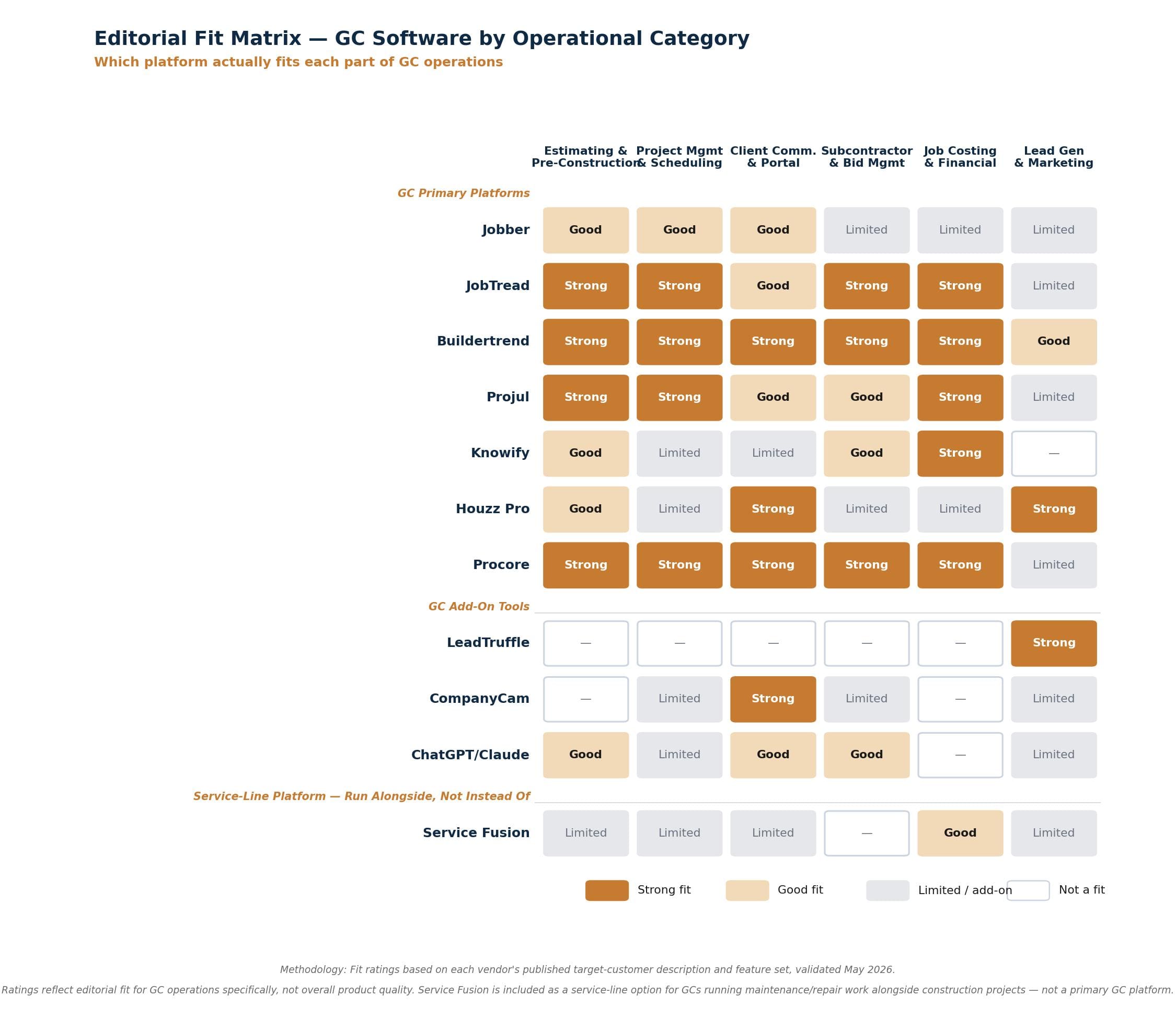
Ratings reflect a 1-5 scale where 5 = purpose-built for this operational category at this GC size, 1 = unsuitable or not designed for this use case. Methodology: each rating triangulates published vendor documentation, third-party software reviews, and our own analysis of the platform’s target customer description.
Procore: the enterprise standard worth understanding
Procore is the dominant enterprise construction management platform — used by most of the largest GCs in commercial construction. Pricing is custom-quoted and Procore doesn’t publish public rates. Importantly, Procore uses Annual Construction Volume (ACV) pricing, not per-user pricing — your annual project volume determines your subscription cost, and unlimited users are included on all plans. Per third-party analyses by ITQlick, ScanManifold, and Projul’s pricing analysis, contractors typically pay:
- Small GCs ($10M-$50M ACV): roughly $15,000-$30,000/year
- Mid-size GCs ($50M-$200M ACV): roughly $30,000-$80,000/year
- Smallest tier monthly equivalent: starting around $375/month, scaling up to $4,000+/month for larger contractors
Modules (Project Management, Quality & Safety, Financial Management, Resource Management, BIM, and more) are separately licensed and stack into the total contract value.
What you’re paying for: the most comprehensive construction management platform available, with deep integration to construction accounting (Sage, Foundation), BIM tools (Revit, Navisworks), and document control workflows. Multi-company portfolio management, advanced reporting, owner/architect/engineer collaboration portals.
Honest read on who should consider Procore:
- Commercial GCs at $20M+ revenue: Procore is increasingly the default at this scale. The platform’s depth and the industry’s expectation that you’re running it tip the math toward “yes, even though it’s expensive.”
- Residential GCs at large scale: Maybe. Buildertrend Complete or JobTread handle most residential GCs without significant compromise on platform capability. Procore at residential scale is often more platform than you need — the integrations and depth that justify Procore (BIM, commercial document control, owner/architect portals) are less relevant in residential work.
- Anyone under $10M revenue: No. The implementation cost (typically $5,000–$25,000), the 6–12 month deployment timeline, and the per-user pricing make Procore economically irrational for smaller GCs. The platforms designed for your scale (Buildertrend, JobTread, Projul) will deliver 80% of the value at 10% of the cost.
The strategic angle worth understanding even at smaller scale: Procore is where the construction software market is going. Their open API, marketplace of integrations, and platform-of-platforms positioning is the direction most other vendors are eventually moving toward. Worth tracking even if you’re not buying.
Chart generated May 2026 from vendor pricing pages; several figures on it have since changed — the table below carries the prices read on October 12, 2026. Tools grouped by GC size tier. Sources: getjobber.com/pricing · jobtread.com · knowify.com/pricing · buildertrend.com/pricing · projul.com · houzz.com/pro · procore.com. Procore custom-quoted; per-user-per-year range via third-party comparison platforms.
The recommended stacks
| Platform | What the vendor publishes | Billing basis | Source |
|---|---|---|---|
| Buildertrend | Quote only — no public pricing. 10% off if paid annually upfront. | Quote | buildertrend.com |
| Procore | Quote only — no public pricing. Quoted by company type; unlimited users and storage included. | Quote | procore.com |
| ServiceTitan | Quote only — no public pricing. Priced per technician; requires a demo. | Quote | servicetitan.com |
| JobTread | $199/mo + $20 per internal user (users 2–10). 20% off annual. No contract or setup fee. | Month-to-month | jobtread.com |
| Projul | Starter $199/mo, Core $399/mo, Core+ $599/mo, Pro $1,199/mo billed annually; $249–$1,599/mo month-to-month. No per-user fees; up to 3 / 10 / 20 / unlimited users. | Monthly or annual | projul.com |
| Jobber | Core $49/mo (1 user), Grow $199/mo (1 user) to $399/mo (10 users), Plus to $699/mo (15 users). no per-user rate published. | Month-to-month | getjobber.com |
| Knowify | Core $99/mo and Advanced $329/mo on yearly billing; $149/mo and $399/mo billed monthly. Knowify does not publish a per-additional-user rate. Enterprise quote only. | Both offered | knowify.com |
| Service Fusion | Quote only — no public pricing. Starter, Plus and Pro tiers are priced on request (read October 12, 2026; earlier figures on this page came from hidden page code, not the rendered page). | Month-to-month | servicefusion.com |
| FieldCamp | Not published — quote only (four tiers: Pro, Growth, Scale, Enterprise). Checked October 12, 2026. | Month-to-month | fieldcamp.ai |
| CompanyCam | Core $63/mo (1 user), Crew $119/mo (3 users), Scale $249/mo (3 users), +$29 per extra user, billed annually; $79 / $149 / $299 and +$34 per user billed monthly. | Annual rates shown | companycam.com |
| NiceJob | Starter $75/mo, Pro $125/mo. 14-day trial, no contract. | Monthly only | get.nicejob.com |
| LeadTruffle | Quote only — no public pricing. Essential, Growth and Scale tiers priced by monthly lead volume; month-to-month, no long-term contract. | Quote | leadtruffle.co |
Vendor prices change without notice. For the current verified figures on every vendor we track — read from each vendor’s own pricing page and dated — see the contractor software pricing tracker.
All figures re-verified against each vendor’s public pricing page on October 12, 2026. Six of the twelve platforms here publish no pricing at all — Buildertrend, Procore, ServiceTitan, Service Fusion, FieldCamp and LeadTruffle quote every deal, so this table says so rather than estimating a number. Billing basis is listed per row because it differs: Projul and CompanyCam both quote annual rates that rise on monthly billing.
Small GC ($500K revenue)
| Tool | Plan | Monthly cost |
|---|---|---|
| Jobber Grow | 2–5 users | $299 |
| ChatGPT Plus | 1 user | $20 |
| CompanyCam Crew | 3 users | $149 |
| QuickBooks Online | Simple Start | $38 |
| Total | ~$506/month (all monthly billing) |
When to upgrade: more than 2 active projects exceeding 30 days, OR hiring an office manager, OR crossing $500K annualized revenue.
Mid GC ($1.5M revenue)
| Tool | Plan | Monthly cost |
|---|---|---|
| JobTread or Projul | 8 users | $339–$529 |
| LeadTruffle | quote-only | not published |
| CompanyCam Scale | 5 users | $367 ($299 + 2 × $34) |
| ChatGPT Business | 3 users | $75 |
| QuickBooks Online Plus | Plus | $140 |
| Total | ~$921–$1,111/month (all monthly billing) + LeadTruffle (quote-only) |
Plus the LeadTruffle quote, which is priced by monthly lead volume.
When to upgrade: dedicated estimator on payroll, $3M+ revenue, or expanding into commercial work.
Large GC ($5M+ revenue)
| Tool | Plan | Monthly cost |
|---|---|---|
| Buildertrend Complete or Procore | per scope | Quoted (Procore ~$375–$4,000+/mo per third-party analyses) |
| LeadTruffle Growth | by lead volume | Quoted |
| CompanyCam Scale | 3 users | $299 |
| ChatGPT Business | 8 users | $200 |
| Sage 300 Construction & Real Estate or QuickBooks Enterprise | per scope | Quoted |
| Total | ~$499/month in published subscriptions + three quoted lines |
This is the range where the question shifts from “which platform” to “which integrations” — your construction accounting, payroll, and insurance/lien tracking tools matter more than your primary platform choice at this scale.
FAQ
What are the best tools for contractors in 2026? It depends on your trade and size. For general contractors, the stack in this guide — JobTread or Buildertrend for project management, CompanyCam for photos, LeadTruffle for lead capture — covers the six categories that matter. If you run a service trade instead, start with our guides for plumbers, electricians, and HVAC contractors, which pick tools for service dispatch rather than project management. The one universal answer: pick tools that integrate with each other, not six point solutions that do not talk to each other.
Can ChatGPT replace estimating software for general contractors? For Small GCs under $500K revenue, ChatGPT can handle 80% of what construction estimating software offers — proposal language, scope-of-work narratives, line-item formatting. It cannot replace your knowledge of local pricing, your overhead structure, or your historical job costs. Treat it as a proposal-writing assistant, not a pricing oracle. For Mid and Large GCs, ChatGPT alongside a construction platform (JobTread, Buildertrend, Projul) is the right model — not ChatGPT instead of one.
What’s the cheapest GC software with AI features? Jobber at $49/month for Core or $199/month for Grow (one user; $299/month with five users included) is the cheapest entry point, paired with ChatGPT Plus at $20/month for the AI layer. For construction-specific platforms with native AI features, JobTread at $199/month is the cheapest option.
Is Buildertrend or JobTread better for residential GCs? Different tradeoffs. Buildertrend is more polished, has a stronger client portal, and is custom-quoted (Buildertrend publishes no plan prices). JobTread is more technically open, ships AI features faster (the AI Connector), and starts cheaper at $199/month plus $20/user. For high-end residential and design-build GCs where the client portal experience matters most, Buildertrend. For GCs who value AI integration and pricing flexibility, JobTread. Most Mid-tier GCs would be served well by either — the decision often comes down to which platform’s interface their team adopts faster.
Do I need ServiceTitan, FieldCamp, or Service Fusion if I’m a GC, not a service business? Probably not for primary GC operations. These platforms are optimized for residential service businesses (HVAC, plumbing, electrical, landscape maintenance) where the unit of work is a dispatched call, not a multi-month project. ServiceTitan’s strengths — Good/Better/Best pricing presentation, in-field financing, dispatch optimization — don’t translate to GC workflows. FieldCamp and Service Fusion have the same fit issue. The exception: GCs running a meaningful service line alongside construction (remodelers with handyman repair, builders maintaining client portfolios) can use Service Fusion for the service side while running JobTread, Projul, or Buildertrend on the construction side. GCs looking at enterprise construction platforms should evaluate Procore (commercial) or Buildertrend Complete (residential at scale).
When should a GC switch from Jobber to a construction-specific platform? Three signals: (1) you have more than 2 active projects exceeding 30 days in duration, (2) you’re hiring an office manager or dedicated PM, or (3) you’re crossing $500K annualized revenue. Any one of these makes Jobber’s job-costing limitations start showing. All three together is the strong signal — that’s when JobTread, Projul, or Buildertrend will start paying for themselves through better margin protection and reduced PM overhead.
Quick Links: Every Tool Reviewed
Jobber
The right starting platform for under-$500K GCs
Best for: Owner-operator GCs with 1–3 simultaneous projects under 30 days each. Strong quoting, scheduling, and customer communication. Pairs naturally with ChatGPT Plus for proposal language. Honest limitation: Jobber’s job costing is basic compared to construction-specific platforms.
Team: Grow $299 (5u) · Grow $399 (10u) · Plus $699 (15u)
Annual saves up to 25%
ChatGPT Plus
Cheapest entry to AI-assisted estimating language
Best for: Small GCs needing proposal language, scope-of-work narratives, and line-item formatting. Handles 80% of what construction estimating software offers for under-$500K operations. Cannot replace knowledge of local pricing, overhead structure, or historical job costs.
ChatGPT Plus $20/mo · Claude Pro $20/mo
JobTread
Open-API construction platform with native AI Connector
Best for: Mid GCs who value AI integration and technical openness. Reached 10,000 customer companies in February 2026. Launched its AI Connector in April 2026 — a Model Context Protocol (MCP) server connecting JobTread directly to ChatGPT, Claude, and other AI tools. Strong estimating, scheduling, bid management, and job costing. Client portal less polished than Buildertrend.
Monthly: $199/mo + $20/user
Unlimited projects · Tiered breaks after 10 users
Projul
Contractor-built, flat-rate, no per-user fees
Best for: Mid GCs with 5–15 staff who want predictable pricing as their team grows. Founded by GC Kurt Clayson after 3,000+ projects. Flat-rate model means no per-seat fees, but cost steps up at each tier’s user cap (3 / 10 / 20). White-glove onboarding included on annual Core and above. Real-time job costing, QuickBooks 2-way sync. Sweet spot is 5–15 employee operations; reaches up into large GCs.
$249–$1,599/mo month-to-month · up to 3 / 10 / 20 / unlimited users
Premium support package free on annual Core and above
Buildertrend
Dominant residential GC platform with polished client portal
Best for: Mid and Large residential GCs where client portal experience matters most. High-end residential, design-build, owner-clients who expect software-grade transparency. Heaviest investment in client portal in the category. Mature estimating, change order management, CRM. Onboarding fee applies.
10% off annual prepay promo · Unlimited users
Knowify
Job costing depth for commercial subs and GCs
Best for: Mid GCs with significant commercial work, especially those running subcontractor lines of business or requiring AIA billing. Strongest QuickBooks integration in the category. Change order management, labor burden tracking. Skip Knowify for residential-only operations — Projul or JobTread will fit better. Knowify shines when commercial AIA workflows are core to the business.
(annual/monthly billing), no published per-user rate
Enterprise: custom · verified October 12, 2026
Service Fusion
Flat-rate FSM for GCs with active service lines
Best for: GCs running a service line alongside project work — remodelers with handyman service, builders maintaining client portfolios on ongoing maintenance. Not the right primary platform for construction project work; pair with JobTread, Projul, or Buildertrend for the project side.
Starter, Plus and Pro tiers · priced on request
Houzz Pro
Design-build GC tool with integrated lead marketplace
Best for: Design-build GCs and high-end residential where Houzz marketplace lead flow is geographically strong. Mood board and selection tools that residential clients understand intuitively. Strong client portal. Most GCs running it use it alongside Buildertrend or JobTread for construction-side management. Honest read: more sales-and-design tool than construction platform.
Teams from $399/mo (unlimited users) · +$50/user on single-user plans
Read October 12, 2026 · no annual toggle shown
Procore
Enterprise construction management standard
Best for: Commercial GCs at $20M+ revenue; residential GCs at $10M+ considering platform consolidation. Deep integration with construction accounting (Sage, Foundation), BIM tools (Revit, Navisworks), and document control. Multi-company portfolio management, advanced reporting, owner/architect collaboration portals. Implementation typically 6–12 months. Under $10M revenue: economically irrational vs. Buildertrend Complete or JobTread.
ACV-based pricing, not per-user*
~$375-$4,000+/mo · Unlimited users
$5,000–$25,000 implementation
*Per third-party comparison platforms
Buildertrend Complete
Residential GC enterprise tier through ~$10M revenue
Best for: Established residential GCs with dedicated estimators and PMs. Mature assembly library, sophisticated change order management, the platform handles concurrent estimators without breaking down. The trigger to evaluate Sage 300 Construction & Real Estate or Procore is when your construction accounting needs outgrow Buildertrend’s native financial tools — not a specific revenue threshold.
10% off annual prepay promo
Unlimited users included
CompanyCam
Photo documentation that becomes the project timeline
Best for: Any GC doing visual documentation of projects. Location-based photo organization means homeowners see all photos from their project in one feed, organized by date and area. Strong as the visual layer of client portals. No user minimum since the 2026 restructure — Core includes one user.
Crew $119/mo annual — 3 users
Scale $249/mo annual — 3 users
Monthly: $79 / $149 / $299 · +$29/user annual, +$34 monthly
LeadTruffle
AI-powered lead response automation
Best for: Any GC doing paid lead generation. Automated response within seconds of a lead arriving, AI-powered conversation handling, qualification before handing off. Most leads go cold because nobody responds within 5 minutes — LeadTruffle solves that gap.
Growth
Scale
Priced by monthly lead volume · month-to-month
NiceJob
Automated review request management
Best for: Any GC building local SEO and reputation. Handles review request flow, monitors review platforms, auto-shares positive reviews to social channels. Pairs naturally with LeadTruffle — LeadTruffle converts the lead, NiceJob captures the review after the job closes.
Pro $125/mo
The Augmented Trades Recommended Stack by GC Size
($500K and under)
($500K–$3M)
($3M+)
Affiliate disclosure: Augmented Trades earns commissions when readers sign up for Jobber, LeadTruffle, NiceJob, Service Fusion, or and Projul through our links. We do not currently earn commissions on Buildertrend, JobTread, Houzz Pro, Procore, Knowify, or Sage. Pricing was re-verified October 12, 2026 from each vendor’s published pricing page where available; figures for Procore and Sage 300 Construction & Real Estate come from third-party software comparison platforms where vendors don’t publish public rates.
Want the prompts we use?
We turned our research into a 25-prompt pack for trade contractors — for estimates, client communication, proposals, and business operations. Copy, paste, adapt. Save hours every week.
Related: our guide to business management (ERP) software for contractors.
Related: Running a lean crew? See our honest picks in Best Software for Small Contractors (2026).
Affiliate disclosure: Augmented Trades participates in affiliate programs and may earn a commission when you sign up through links on this page, at no additional cost to you. We never accept payment for placement or rankings. We earn affiliate commissions on some links, and those never change which tool wins a category. See our full affiliate disclosure.
Related: JobTread reviews (290+ remodelers) · Work Order Software for Contractors (2026)
AI tools for general contractors: FAQs
Which parts of a GC’s job do AI tools actually help with? The biggest wins span the project lifecycle: project management and scheduling, field service coordination for your field teams, job costing against the budget in real time, and time tracking from the job site. Used together they save time and cut the admin that eats a GC’s evenings.
Can AI help with compliance and documentation? Yes — newer tools handle automated compliance and keep audit trails of approvals and changes across a construction project, which matters for larger organizations managing multiple sites and field operations.
Do I need separate apps for the office and the field? Increasingly no — workforce management and project management are converging, so a single management tool can connect the office and the field instead of stitching together point solutions.
What are the best tools for contractors in 2026?
The best tools for contractors in 2026 come down to your trade and your shop size, but the categories that actually move the needle are consistent across the trades: estimating and takeoffs, scheduling and project management, invoicing and payments, and customer communication. This guide ranks the picks for general contractors by tier; for trade-specific shortlists, see our companion guides on the best AI tools for plumbers, electricians, HVAC contractors, and landscapers. Not sure where to start? Our free Tool Finder matches the best tools for contractors to your trade and size in about a minute.
Related guide: Best CRM Software for Contractors
Related: Winning the job starts with the bid itself — our guide to the best proposal software for contractors compares dedicated document tools against the quoting built into the platforms above.

Michael is the founder of Augmented Trades, an independent site that compares AI and software tools for trade contractors on published pricing, contracts, and real feature limits. Tools are recommended on fit for your shop — affiliate partnerships never decide coverage.